For a decade, Ingress was how traffic got into a Kubernetes cluster. That era is changing – not only because the API has stopped evolving and the most widely used controller is no longer maintained, but because Kubernetes traffic management has outgrown what the Ingress model was designed to handle.
This guide walks through a complete Ingress to Gateway API migration : how Ingress works and where it falls short, what Gateway API adds, a step-by-step migration you can run against a real cluster (including a cutover plan), and how the same API extends into the service mesh for east-west traffic.
Prerequisites: Kubernetes 1.26+, kubectl and helm installed, and cluster-admin access for CRD installation.
Why This Is Happening Now
Two things are important to understand:
- Ingress API: The Kubernetes Ingress API is not deprecated or being removed, but it is feature-frozen. New traffic-management features are being developed in Gateway API instead.
- Ingress NGINX: The widely used ingress-nginx controller was retired in March 2026. It no longer receives new releases, bug fixes, or security patches.
Your existing Ingress setup won’t suddenly stop working, but staying on it means relying on a controller that won’t receive future fixes and an API that won’t gain new features.
How Ingress Works and Where It Falls Short
How Ingress Works
An Ingress resource is a set of rules for routing incoming HTTP/HTTPS traffic to Services inside the cluster. An Ingress Controller watches those rules and configures the underlying proxy or load balancer accordingly:
Client → Load Balancer → Ingress Controller → Service → Pod
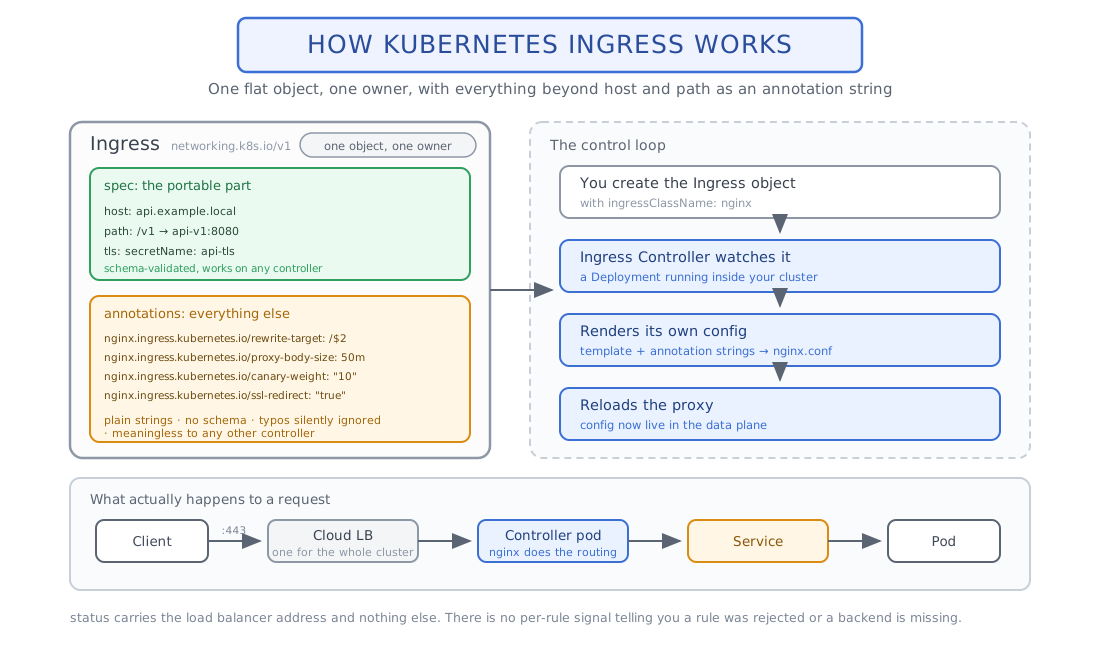
For example, a request to api.example.com/users can be routed by the Ingress Controller to the Service that exposes the users application. Ingress defines the rules; the controller actually handles the traffic.
Where Ingress Breaks Down
Ingress was intentionally designed with a small set of capabilities: hosts, paths, backends, and TLS. As requirements grew – traffic splitting, header-based routing, redirects, retries, timeouts – implementations added them through controller-specific annotations. That couples your configuration to one controller: an annotation supported by ingress-nginx may not work with Traefik or anything else.
Ingress also puts infrastructure and application routing into the same resource, which makes it hard to separate what the platform team owns from what application teams own.
Gateway API: The Solution
Gateway API replaces the single flat Ingress object with several typed resources, each owned by the team responsible for it:
| Resource | Purpose |
|---|---|
| GatewayClass | Defines the type of Gateway implementation |
| Gateway | Defines where traffic enters – listeners, ports, protocols, and TLS |
| HTTPRoute, GRPCRoute, TCPRoute, etc. | Defines how traffic is matched and where it should go |
| ReferenceGrant | Controls cross-namespace references |
| Policy attachment | Extends behavior that isn’t part of the core route spec, such as BackendTLSPolicy or implementation-specific policies (e.g. rate limiting, circuit breaking) |
GatewayClass → Gateway → Route → Service
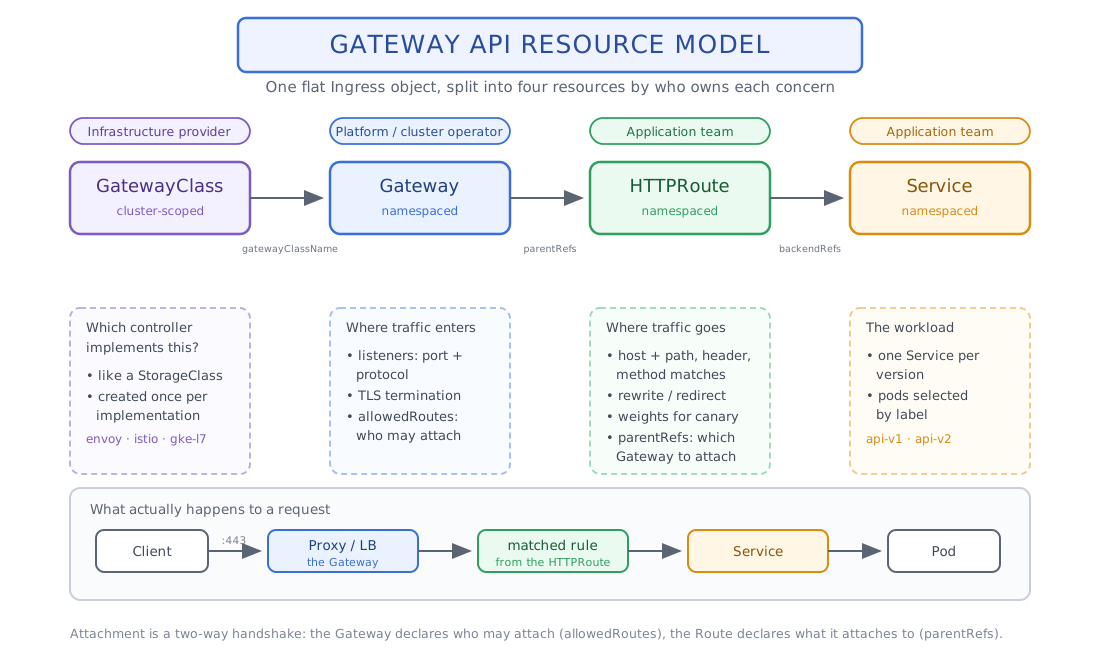
The Gateway defines where traffic enters; the Route defines where that traffic goes. The two reference each other explicitly: the Gateway controls which namespaces may attach routes, and each Route names the Gateway (and optionally the specific listener) it wants to attach to.
Typed Configuration Instead of Annotations
Routing matches, filters, traffic weights, timeouts, and backend references are structured fields rather than annotation strings, so they can be validated by the API server and behave the same across conformant implementations. Core features include:
- Header, query parameter, and method matching
- Weighted traffic splitting for canary and blue/green rollouts
- Request and response header modification
- URL rewrites and redirects
- Request mirroring
- Request timeouts (a native
timeoutsfield on HTTPRoute rules) - Cross-namespace routing, gated by ReferenceGrant
Features such as WAF, rate limiting, and external authentication are still implementation-specific, so plan for some portability work there.
Clear Separation of Responsibilities
The platform team manages GatewayClasses and Gateways – load balancers, listeners, TLS, and which namespaces may attach routes. Application teams manage their own HTTPRoutes without needing access to that infrastructure. The RBAC example later in this post shows how to enforce the split.
Better Status and Visibility
Gateway API reports state through standard conditions, split between the Gateway and its Routes:
- Gateway – Accepted: the controller accepted the Gateway configuration.
- Gateway – Programmed: the data plane (the proxy or load balancer behind the Gateway) has been configured and is ready to serve traffic.
- Route – Accepted: the Route was allowed to attach to its parent Gateway or listener.
- Route – ResolvedRefs: every backend the Route points at exists and is permitted.
The Same Model Extends to the Mesh
Gateway API is not limited to north-south traffic. Through GAMMA (covered in Part 4), the same route types also describe east-west traffic between services, giving you one API for both directions.
Feature Comparison: Ingress vs. Gateway API vs. GAMMA Mesh
| Feature | Ingress | Gateway API (north-south) | GAMMA (mesh / east-west) |
|---|---|---|---|
| Host/path routing | Yes | Yes | Yes (via Service parentRef) |
| Header/query/method matching | Annotation-only, controller-specific | Native typed field | Native typed field |
| Traffic splitting (canary) | Annotation-only | Native weights | Native weights |
| Cross-namespace routing | Not supported | ReferenceGrant | ReferenceGrant |
| mTLS between services | Not applicable | Not applicable | Provided by the mesh (e.g. Istio sidecars), not by the GAMMA API |
| Status/condition reporting | Minimal | Gateway: Accepted/Programmed; Route: Accepted/ResolvedRefs | Route: Accepted/ResolvedRefs |
| Timeouts/retries | Annotation-only | Native timeouts field on HTTPRoute; retry support varies by implementation | Same fields, enforced by the mesh data plane |
| Portability across controllers | Poor | Good for core routing | Good (GAMMA-conformant meshes) |
| L7 policy on mesh traffic | N/A | N/A | Enforced by the mesh (e.g. Istio); GAMMA only defines the routes |
Hands-On, Part 1: Installing Gateway API + Envoy Gateway
Create the Demo Namespace and Apps
Every example in this post uses a shop namespace with two versions of a small echo service, plus an api Service that spans both versions:
# demo-app.yaml
apiVersion: v1
kind: Namespace
metadata:
  name: shop
---
apiVersion: apps/v1
kind: Deployment
metadata:
  name: api-v1
  namespace: shop
spec:
  replicas: 1
  selector:
    matchLabels: {app: api, version: v1}
  template:
    metadata:
      labels: {app: api, version: v1}
    spec:
      containers:
        - name: api
          image: hashicorp/http-echo:1.0
          args: ["-listen=:8080", "-text=hello from api-v1"]
          ports:
            - containerPort: 8080
---
apiVersion: apps/v1
kind: Deployment
metadata:
  name: api-v2
  namespace: shop
spec:
  replicas: 1
  selector:
    matchLabels: {app: api, version: v2}
  template:
    metadata:
      labels: {app: api, version: v2}
    spec:
      containers:
        - name: api
          image: hashicorp/http-echo:1.0
          args: ["-listen=:8080", "-text=hello from api-v2"]
          ports:
            - containerPort: 8080
---
apiVersion: v1
kind: Service
metadata:
  name: api-v1
  namespace: shop
spec:
  selector: {app: api, version: v1}
  ports:
    - name: http
      port: 8080
      targetPort: 8080
---
apiVersion: v1
kind: Service
metadata:
  name: api-v2
  namespace: shop
spec:
  selector: {app: api, version: v2}
  ports:
    - name: http
      port: 8080
      targetPort: 8080
# "api" selects both versions; in-mesh clients call this name (Part 4)
---
apiVersion: v1
kind: Service
metadata:
  name: api
  namespace: shop
spec:
  selector: {app: api}
  ports:
    - name: http
      port: 8080
      targetPort: 8080
kubectl apply -f demo-app.yaml
kubectl -n shop rollout status deploy/api-v1 deploy/api-v2
kubectl -n shop get svc   # api, api-v1, api-v2
Install the CRDs and Envoy Gateway
Install the Gateway API CRDs once, from the standard channel, then install Envoy Gateway without its bundled copy of them:
# 1. Gateway API CRDs (standard channel) - the single source of truth
kubectl apply --server-side \
  -f https://github.com/kubernetes-sigs/gateway-api/releases/download/v1.6.2/standard-install.yaml

# 2. Envoy Gateway's own CRDs only
helm template eg-crds oci://docker.io/envoyproxy/gateway-crds-helm \
  --version v1.9.1 \
  --set crds.gatewayAPI.enabled=false \
  --set crds.envoyGateway.enabled=true \
  | kubectl apply --server-side -f -

# 3. The Envoy Gateway controller, without bundled CRDs
helm install eg oci://docker.io/envoyproxy/gateway-helm \
  --version v1.9.1 -n envoy-gateway-system --create-namespace \
  --set crds.enabled=false

kubectl -n envoy-gateway-system rollout status deploy/envoy-gateway
kubectl get crd | grep gateway.networking
Define the GatewayClass
# gatewayclass.yaml
apiVersion: gateway.networking.k8s.io/v1
kind: GatewayClass
metadata:
  name: envoy
spec:
  controllerName: gateway.envoyproxy.io/gatewayclass-controller
Create the TLS Secret
All hostnames in this post live under example.com: api.example.com for the main API and partner.example.com for the partner route in Part 3. One certificate covers both. For a local test, a self-signed certificate is enough:
openssl req -x509 -nodes -newkey rsa:2048 -days 365 \
  -keyout tls.key -out tls.crt -subj "/CN=api.example.com" \
  -addext "subjectAltName=DNS:api.example.com,DNS:partner.example.com"

kubectl create secret tls api-tls --cert=tls.crt --key=tls.key -n shopDefine the Gateway
The Gateway has two listeners: https terminates TLS for application traffic, and http-redirect on port 80 exists only to send clients to HTTPS (Part 2). In a production cluster the platform team would usually keep the Gateway in its own infrastructure namespace; it lives in shop here to keep the demo small.
# gateway.yaml
apiVersion: gateway.networking.k8s.io/v1
kind: Gateway
metadata:
  name: api-gateway
  namespace: shop
spec:
  gatewayClassName: envoy
  listeners:
    - name: https
      protocol: HTTPS
      port: 443
      tls:
        mode: Terminate
        certificateRefs:
          - kind: Secret
            name: api-tls
      allowedRoutes:
        namespaces:
          from: Same
    - name: http-redirect
      protocol: HTTP
      port: 80
      allowedRoutes:
        namespaces:
          from: Same
Define an HTTPRoute
Setting sectionName: https attaches the route to the HTTPS listener only. Without it, the route would attach to every listener it is allowed on – including plain HTTP on port 80.
# route.yaml
apiVersion: gateway.networking.k8s.io/v1
kind: HTTPRoute
metadata:
  name: api
  namespace: shop
spec:
  parentRefs:
    - name: api-gateway
      sectionName: https
  hostnames:
    - api.example.com
  rules:
    - matches:
        - path:
            type: PathPrefix
            value: /v1
      backendRefs:
        - name: api-v1
          port: 8080
Apply and Verify
kubectl apply -f gatewayclass.yaml -f gateway.yaml -f route.yaml

# GatewayClass and Gateway: Accepted, then Programmed
kubectl get gatewayclass envoy
kubectl -n shop wait --for=condition=Programmed gateway/api-gateway --timeout=180s

# Route: Accepted=True and ResolvedRefs=True
kubectl -n shop get httproute api \
  -o jsonpath='{range .status.parents[*].conditions[*]}{.type}={.status}{"\n"}{end}'

# Send a request through the Gateway
export GW_IP=$(kubectl -n shop get gateway api-gateway -o jsonpath='{.status.addresses[0].value}')
curl -sk --resolve api.example.com:443:$GW_IP https://api.example.com/v1/
# hello from api-v1
If the Gateway address is a hostname rather than an IP (for example an AWS load balancer), resolve it first with dig +short and pass the IP to --resolve. In a cluster without a LoadBalancer implementation, port-forward to the Envoy Service in envoy-gateway-system instead.
Hands-On, Part 2: Ingress to Gateway API Migration
This is the actual migration, not a fresh install. Say you’re running this on ingress-nginx today. In ingress-nginx, a canary is a second Ingress with the same host and path that carries the canary annotations and points at the new version; it inherits the rewrite and redirect behavior from the primary Ingress.
# Primary Ingress
apiVersion: networking.k8s.io/v1
kind: Ingress
metadata:
  name: api-ingress
  namespace: shop
  annotations:
    nginx.ingress.kubernetes.io/use-regex: "true"
    nginx.ingress.kubernetes.io/rewrite-target: /$2
    nginx.ingress.kubernetes.io/ssl-redirect: "true"
spec:
  ingressClassName: nginx
  tls:
    - hosts: [api.example.com]
      secretName: api-tls
  rules:
    - host: api.example.com
      http:
        paths:
          - path: /v1(/|$)(.*)
            pathType: ImplementationSpecific
            backend:
              service:
                name: api-v1
                port:
                  number: 8080
---
# Canary Ingress: same host and path, sends 20% of traffic to api-v2
apiVersion: networking.k8s.io/v1
kind: Ingress
metadata:
  name: api-ingress-canary
  namespace: shop
  annotations:
    nginx.ingress.kubernetes.io/canary: "true"
    nginx.ingress.kubernetes.io/canary-weight: "20"
spec:
  ingressClassName: nginx
  rules:
    - host: api.example.com
      http:
        paths:
          - path: /v1(/|$)(.*)
            pathType: ImplementationSpecific
            backend:
              service:
                name: api-v2
                port:
                  number: 8080
Generate a Starting Point with ingress2gateway
The ingress2gateway tool reads your Ingress resources and prints equivalent Gateway API manifests. Treat its output as a draft: review the Gateway name and class, the listeners, and any warnings about annotations it couldn’t translate.
# Install: go install github.com/kubernetes-sigs/ingress2gateway@v1.0.0 (or brew install ingress2gateway)
ingress2gateway print --providers=ingress-nginx -n shop > generated.yaml
Map Each Annotation to a Typed Field
Here are the equivalent Gateway API resources, with each annotation mapped to a typed field:
| Ingress annotation | Gateway API equivalent |
|---|---|
| ssl-redirect: “true” | A separate HTTPRoute on the HTTP listener with a RequestRedirect filter (scheme: https, statusCode: 308) |
| rewrite-target: /$2 | URLRewrite filter with type: ReplacePrefixMatch |
| Second Ingress with canary: “true” + canary-weight: “20” | One rule with two backendRefs weighted 80/20 |
| Regex path capture group | PathPrefix match (Gateway API doesn’t support arbitrary regex rewrite groups – see note below) |
The migrated route below reuses the name api, so applying it replaces the simple route from Part 1. It also shows the native timeouts field – no policy resource needed.
# api-route.yaml
apiVersion: gateway.networking.k8s.io/v1
kind: HTTPRoute
metadata:
  name: api
  namespace: shop
spec:
  parentRefs:
    - name: api-gateway
      sectionName: https
  hostnames:
    - api.example.com
  rules:
    - matches:
        - path:
            type: PathPrefix
            value: /v1
      filters:
        - type: URLRewrite
          urlRewrite:
            path:
              type: ReplacePrefixMatch
              replacePrefixMatch: /
      timeouts:
        request: 10s
      backendRefs:
        - name: api-v1
          port: 8080
          weight: 80
        - name: api-v2
          port: 8080
          weight: 20
Redirect HTTP to HTTPS
The ssl-redirect behavior becomes its own HTTPRoute attached only to the http-redirect listener. It uses status code 308, which is what ingress-nginx returns by default. Because the application routes use sectionName: https, they never serve plain HTTP.
# redirect-route.yaml
apiVersion: gateway.networking.k8s.io/v1
kind: HTTPRoute
metadata:
  name: https-redirect
  namespace: shop
spec:
  parentRefs:
    - name: api-gateway
      sectionName: http-redirect
  rules:
    - filters:
        - type: RequestRedirect
          requestRedirect:
            scheme: https
            statusCode: 308
kubectl apply -f api-route.yaml -f redirect-route.yaml
# Redirect: expect 308 with a Location header pointing at https://
curl -sI --resolve api.example.com:80:$GW_IP http://api.example.com/v1/
# Canary split: roughly 16 responses from api-v1 and 4 from api-v2
for i in $(seq 1 20); do
curl -sk --resolve api.example.com:443:$GW_IP https://api.example.com/v1/
done | sort | uniq -c
Hands-On, Part 3: Cross-Namespace Routing with ReferenceGrant
This is one of Gateway API’s headline features over Ingress: a route in one namespace can attach to a Gateway or target a backend in another, but only when both sides explicitly allow it.
Say a partner-facing route needs to live in partner-api (owned by a different team), attach to the Gateway in shop, and send traffic to api-v1 in shop. Three things have to line up: the route, a ReferenceGrant for the backend, and the Gateway’s allowedRoutes.
Create the Route
kubectl create namespace partner-api# partner-route.yaml
apiVersion: gateway.networking.k8s.io/v1
kind: HTTPRoute
metadata:
name: partner-route
namespace: partner-api
spec:
parentRefs:
- name: api-gateway
namespace: shop
sectionName: https
hostnames:
- partner.example.com
rules:
- backendRefs:
- name: api-v1
namespace: shop
port: 8080Allow the Backend Reference
Without a ReferenceGrant, this route reports ResolvedRefs: False. The owner of the shop namespace has to allow it explicitly:
# referencegrant.yaml
apiVersion: gateway.networking.k8s.io/v1beta1
kind: ReferenceGrant
metadata:
  name: allow-partner-api
  namespace: shop
spec:
  from:
    - group: gateway.networking.k8s.io
      kind: HTTPRoute
      namespace: partner-api
  to:
    - group: ""
      kind: Service
      name: api-v1
Allow the Route to Attach to the Gateway
The https listener currently accepts routes from Same namespace only. Switch it to a label selector – but label both namespaces first. A Selector replaces the Same rule rather than adding to it, so if shop isn’t labelled, the existing api route detaches and production traffic stops.
kubectl label namespace shop gateway-access=allowed
kubectl label namespace partner-api gateway-access=allowed
Then update the https listener in gateway.yaml (the http-redirect listener stays on Same):
    - name: https
      protocol: HTTPS
      port: 443
      tls:
        mode: Terminate
        certificateRefs:
          - kind: Secret
            name: api-tls
      allowedRoutes:
        namespaces:
          from: Selector
          selector:
            matchLabels:
              gateway-access: allowed
kubectl apply -f gateway.yaml -f referencegrant.yaml -f partner-route.yaml
# Both routes should report Accepted=True and ResolvedRefs=True
kubectl -n partner-api get httproute partner-route \
-o jsonpath='{range .status.parents[*].conditions[*]}{.type}={.status}{"\n"}{end}'
kubectl -n shop get httproute api \
-o jsonpath='{range .status.parents[*].conditions[*]}{.type}={.status}{"\n"}{end}'
curl -sk --resolve partner.example.com:443:$GW_IP https://partner.example.com/
# hello from api-v1RBAC for the Platform / Application Team Split
Gateway API’s role separation only holds if RBAC enforces it. In this example the platform team owns GatewayClasses, Gateways, and namespace labels cluster-wide, while the partner team can manage routes only in its own namespace and read (but not change) Gateways:
# rbac.yaml
apiVersion: rbac.authorization.k8s.io/v1
kind: ClusterRole
metadata:
  name: gateway-platform-admin
rules:
  - apiGroups: ["gateway.networking.k8s.io"]
    resources: ["gatewayclasses", "gateways", "referencegrants"]
    verbs: ["get", "list", "watch", "create", "update", "patch", "delete"]
  - apiGroups: [""]
    resources: ["namespaces"]
    verbs: ["get", "list", "watch", "patch"]   # controls the gateway-access label
---
apiVersion: rbac.authorization.k8s.io/v1
kind: ClusterRoleBinding
metadata:
  name: platform-team-gateway-admin
roleRef:
  apiGroup: rbac.authorization.k8s.io
  kind: ClusterRole
  name: gateway-platform-admin
subjects:
  - kind: Group
    name: platform-team
    apiGroup: rbac.authorization.k8s.io
---
apiVersion: rbac.authorization.k8s.io/v1
kind: Role
metadata:
  name: route-editor
  namespace: partner-api
rules:
  - apiGroups: ["gateway.networking.k8s.io"]
    resources: ["httproutes", "grpcroutes"]
    verbs: ["get", "list", "watch", "create", "update", "patch", "delete"]
---
apiVersion: rbac.authorization.k8s.io/v1
kind: RoleBinding
metadata:
  name: partner-team-route-editor
  namespace: partner-api
roleRef:
  apiGroup: rbac.authorization.k8s.io
  kind: Role
  name: route-editor
subjects:
  - kind: Group
    name: partner-team
    apiGroup: rbac.authorization.k8s.io
---
# Read-only view of the shared Gateway, so the partner team can debug attachment
apiVersion: rbac.authorization.k8s.io/v1
kind: Role
metadata:
  name: gateway-viewer
  namespace: shop
rules:
  - apiGroups: ["gateway.networking.k8s.io"]
    resources: ["gateways"]
    verbs: ["get", "list", "watch"]
---
apiVersion: rbac.authorization.k8s.io/v1
kind: RoleBinding
metadata:
  name: partner-team-gateway-viewer
  namespace: shop
roleRef:
  apiGroup: rbac.authorization.k8s.io
  kind: Role
  name: gateway-viewer
subjects:
  - kind: Group
    name: partner-team
    apiGroup: rbac.authorization.k8s.io
Because the platform team controls the gateway-access label, an application team can’t attach routes to the shared Gateway just by creating them – the namespace has to be onboarded first.
Hands-On, Part 4: Service Mesh with Istio Sidecar Mode and GAMMA
Sidecar vs. Ambient: Pick One
Istio has two data plane modes, and this is a fork-in-the-road decision, not something you run both of:
- Sidecar mode (used here): every pod gets its own injected Envoy proxy, so Istio’s L7 features (header matching, retries, mirroring, canary routing) apply to every pod with no extra proxy to deploy. Trade-off: one Envoy container per pod, so resource overhead scales with pod count.
- Ambient mode: a sidecar-less alternative – a per-node ztunnel handles L4 and mTLS, and L7 features require deploying an optional waypoint proxy. Lighter by default, but L7 is opt-in rather than automatic.
Install Istio in Sidecar Mode
Use the minimal profile, which installs only the control plane (istiod). You don’t need Istio’s own ingress or egress gateways here, because Envoy Gateway already handles north-south traffic.
curl -L https://istio.io/downloadIstio | ISTIO_VERSION=1.31.0 sh -
export PATH="$PWD/istio-1.31.0/bin:$PATH"

istioctl install --set profile=minimal -y
kubectl get pods -n istio-system   # only istiod
Istio uses the Gateway API CRDs you installed in Part 1, so keep their version within the range your Istio release supports.
Enroll the Namespace
kubectl label namespace shop istio-injection=enabled --overwrite
kubectl -n shop rollout restart deploy/api-v1 deploy/api-v2

# Verify injection: each pod should list "api istio-proxy"
kubectl get pods -n shop -o jsonpath='{range .items[*]}{.metadata.name}{": "}{.spec.containers[*].name}{"\n"}{end}'

# A long-running in-mesh client for testing
kubectl -n shop run client --image=curlimages/curl:8.10.1 --command -- sleep infinity
The label only affects new pods, which is why the restart is required. Existing pods won’t retroactively get a sidecar.
What Is GAMMA?
GAMMA (Gateway API for Mesh Management and Administration) reuses the same route types – HTTPRoute, GRPCRoute, and so on – for east-west (service-to-service) traffic. The key difference: instead of a route’s parentRef pointing at a Gateway, it points at a Service. The route then applies to traffic addressed to that Service, rather than traffic arriving through an external listener.
GAMMA only defines how routes are expressed. mTLS, workload identity, and L7 policy enforcement come from the mesh implementation – Istio, in this post.
# api-mesh.yaml
apiVersion: gateway.networking.k8s.io/v1
kind: HTTPRoute
metadata:
  name: api-mesh
  namespace: shop
spec:
  parentRefs:
    - group: ""
      kind: Service
      name: api
      port: 8080
  rules:
    # Canary clients
    - matches:
        - headers:
            - name: X-Canary
              value: "true"
      backendRefs:
        - name: api-v2
          port: 8080
    # Everyone else
    - backendRefs:
        - name: api-v1
          port: 8080
Because this route lives in the same namespace as the api Service, it is a producer route: it applies to every meshed client that calls api, in any namespace – not only pods in shop. (A route created in a client’s own namespace is a consumer route and affects only that namespace’s clients.) Requests carrying X-Canary: true go to api-v2; everything else goes to api-v1, with no changes to the caller or either backend.
kubectl apply -f api-mesh.yaml

kubectl -n shop exec client -c client -- curl -s http://api:8080/
# hello from api-v1
kubectl -n shop exec client -c client -- curl -s -H "X-Canary: true" http://api:8080/
# hello from api-v2
mTLS: Keep PERMISSIVE While Envoy Gateway Is the Edge
With sidecars injected, Istio’s default PERMISSIVE mode already uses mTLS between meshed pods, while still accepting plaintext from clients that aren’t in the mesh. Confirm the sidecar has been issued a workload certificate:
POD=$(kubectl -n shop get pod -l app=api,version=v1 -o jsonpath='{.items[0].metadata.name}')
istioctl proxy-config secret $POD -n shop
To mesh the Envoy Gateway proxy (option 2), give its pods a sidecar through an EnvoyProxy resource, keep the sidecar from intercepting inbound client traffic, and route to Service addresses so the sidecar can apply mTLS:
# envoyproxy-mesh.yaml
apiVersion: gateway.envoyproxy.io/v1alpha1
kind: EnvoyProxy
metadata:
  name: data-plane-sidecars
  namespace: envoy-gateway-system
spec:
  routingType: Service
  provider:
    type: Kubernetes
    kubernetes:
      envoyDeployment:
        pod:
          labels:
            sidecar.istio.io/inject: "true"
          annotations:
            traffic.sidecar.istio.io/includeInboundPorts: ""
Reference it from the GatewayClass, then check that the Envoy proxy pods in envoy-gateway-system now include an istio-proxy container and that the curl tests from Parts 1-3 still pass:
# gatewayclass.yaml
apiVersion: gateway.networking.k8s.io/v1
kind: GatewayClass
metadata:
  name: envoy
spec:
  controllerName: gateway.envoyproxy.io/gatewayclass-controller
  parametersRef:
    group: gateway.envoyproxy.io
    kind: EnvoyProxy
    name: data-plane-sidecars
    namespace: envoy-gateway-system
Only once the edge proxy is in the mesh (option 2 or 3) is it safe to require mTLS:
apiVersion: security.istio.io/v1
kind: PeerAuthentication
metadata:
  name: default
  namespace: shop
spec:
  mtls:
    mode: STRICT
Why Two Gateway API Implementations?
You now have Envoy Gateway (Part 1’s north-south Gateway, handling external traffic into shop) and Istio sidecar mode (this section’s mesh routing, handling east-west traffic between services). That’s intentional, not redundant: Envoy Gateway is the entry point at the cluster edge, and Istio handles routing and mTLS between services once traffic is inside. Both use the same Gateway API resource types – one model for both directions of traffic, even with two controllers implementing it.
Cutover Plan: From ingress-nginx to Gateway API
The hands-on parts build the new path. Moving production traffic onto it should be gradual and reversible:
- Run side by side. Install Envoy Gateway alongside ingress-nginx. Each gets its own load balancer address, so live traffic is unaffected.
- Generate and review. Run
ingress2gatewayagainst each namespace, check its output against the annotation mapping above, and apply the Gateway and routes. - Test without DNS. Use
curl --resolveagainst the Gateway address for every hostname and critical path. Compare status codes, redirects, certificates, headers, and response bodies with the ingress-nginx path, and confirm every route reportsAcceptedandResolvedRefs. - Lower the DNS TTL (for example to 60 seconds) at least one old-TTL period before the switch.
- Switch DNS. Point
api.example.comandpartner.example.comat the Gateway address – all at once, or gradually with weighted DNS records. - Watch. Track error rates and latency on the Gateway, and confirm traffic on ingress-nginx drains to zero once the TTL expires.
- Roll back if needed. Leave the Ingress resources and ingress-nginx running until you’re done, so rollback is just pointing DNS back at the ingress-nginx address.
- Decommission. After a soak period with no traffic on ingress-nginx, delete the Ingress resources, uninstall the controller, and restore your normal TTL.
Conclusion
Ingress got Kubernetes traffic this far, but it’s not getting much further. Gateway API replaces it with something more structured, more portable across controllers, and built to grow – from simple routing at the edge to service-mesh traffic control, using the same resources throughout.