Prometheus and Grafana are the default monitoring stack for many DevOps and SRE teams, and they remain a strong foundation for ML monitoring. For backend APIs, microservices, databases and Kubernetes clusters, they track CPU, memory, disk, network traffic, request latency and errors very well. Machine learning (ML) workloads, however, add GPUs, training jobs, data pipelines, inference servers and model behavior that changes as production data changes.
Imagine this situation: your ML inference service runs on Kubernetes. Prometheus shows that CPU usage is only 30%, memory usage is normal and every pod is healthy. The Grafana dashboards are green. Yet users complain that predictions are slow, and the model appears to be producing less accurate results than before.
This is the gap this article addresses. Infrastructure monitoring tells you whether servers, containers and APIs are healthy. It does not tell you whether requests are queueing inside the model server, whether a GPU is throttling or reporting hardware errors, or whether the model is still making good predictions. Prometheus and Grafana are not the problem; collecting only infrastructure metrics is. ML workloads need three extra groups of signals: model-serving metrics, GPU health metrics and data-quality signals.
Below, we look at what infrastructure dashboards miss, which tools fill each gap, and how to turn those signals into PromQL queries, Python instrumentation and alert rules.
What Traditional Infrastructure Monitoring Covers
In a traditional DevOps environment, monitoring starts with infrastructure health. We want to know whether the server is available, whether CPU and memory usage are within acceptable limits, whether the application is responding and whether any containers are restarting. These metrics catch common production issues such as CPU saturation, memory leaks, full disks and application failures.
For example, consider a backend API running in a Kubernetes cluster. Prometheus scrapes metrics from the application and the infrastructure, and Grafana displays them on dashboards. If CPU usage suddenly rises or the API starts returning errors, the team can investigate with these metrics. For many web applications and microservices, this approach works well.
Traditional monitoring answers the question, “Are my infrastructure and application healthy?” ML workloads also need an answer to a second question: “Is my model serving predictions quickly and correctly?” The table below shows how the focus shifts.
Traditional Monitoring vs ML Monitoring
| Traditional monitoring | ML monitoring |
|---|---|
| CPU and memory usage | GPU utilization, memory, errors and throttling |
| API response time | Inference latency percentiles and queue time |
| Application error rate | Inference errors by model version |
| Pod and container health | Model serving and model version health |
| Server availability | Prediction quality and data drift |
Every signal in the right-hand column can still be collected by Prometheus and charted in Grafana, as long as something exposes it. The rest of this article explains where those metrics come from.
Why ML Workloads Need Additional Monitoring Signals
ML workloads have components that a standard backend application does not. During training, a job may use several GPUs, large datasets and distributed compute. During inference, the service must pre-process incoming data, run the model and return a result within a latency budget. Each stage has its own performance and reliability requirements.
For example, a model-serving application on a GPU instance can look healthy at the pod level while requests wait in the model server’s queue, the GPU slows down because of thermal throttling, or the model’s predictions drift because production data no longer matches the training data. None of these problems necessarily shows up in CPU, memory or pod-status metrics.
ML monitoring therefore needs visibility into the model, the data, the inference path and the training workflow. Without it, engineers can spend hours investigating CPU, memory and Kubernetes metrics without finding the real cause.
GPU Monitoring for ML Workloads
High GPU utilization is not a problem by itself. For an inference or training workload, it often means you are getting good value from expensive hardware. A GPU running at 90% with stable latency and an empty queue is a healthy GPU.
Inference becomes slow for more specific reasons: requests queueing because the service is saturated, inefficient batching, GPU memory pressure, thermal or power throttling, slow pre-processing, or a bottleneck elsewhere in the request path. Utilization is useful context, but you need latency, queue and hardware-health metrics to tell which of these is happening.
GPU memory needs the same care. Many frameworks reserve memory up front, so memory near capacity is often expected. TensorFlow maps nearly all GPU memory of visible GPUs by default unless memory growth is enabled, and vLLM pre-allocates a fraction of GPU memory (controlled by --gpu-memory-utilization) for model weights and its KV cache. An alert on “GPU memory above 90%” would fire constantly on these systems without pointing to a real problem.
Focus GPU alerts on conditions that need action:
- Out-of-memory (OOM) events and failed or restarted inference workers.
- Inference latency or SLO breaches, especially p95 and p99 latency.
- Sustained saturation together with queue growth, which signals that capacity is running out.
- GPU hardware errors, such as XID errors reported by the NVIDIA driver and ECC memory errors.
- Thermal or power throttling, which lowers clock speeds and can raise latency without any change in your code.
Interpret temperature in context. A GPU running hot under heavy load is normal; what matters is how close it is to the device’s limits, whether it is throttling and whether workload behavior has changed.
NVIDIA DCGM Exporter is a practical way to get these metrics into Prometheus. It exposes GPU telemetry from NVIDIA Data Center GPU Manager in Prometheus format. Its default counter set includes utilization (DCGM_FI_DEV_GPU_UTIL), framebuffer memory, temperature, power draw and the last XID error (DCGM_FI_DEV_XID_ERRORS). ECC error counters and clock-event (throttling) reasons are not enabled by default; add them to the exporter’s counters file if you need them. Available fields depend on the exporter version, its configuration and the GPU model. On Kubernetes, the NVIDIA GPU Operator can deploy DCGM Exporter for you; see our comparison of the NVIDIA Device Plugin and the NVIDIA GPU Operator.
Monitoring Inference Latency and Errors
Total API latency does not show where the time goes. A single prediction can spend time in pre-processing, waiting in a queue, running on the GPU and post-processing. Model servers expose some of this breakdown. For example, NVIDIA Triton Inference Server reports cumulative queue and compute durations per model and version, vLLM reports running and waiting requests and latency histograms such as time to first token, and KServe exposes pre-processing, prediction and post-processing latency histograms for its Python-based model servers. Metric names, types and labels differ between servers, versions and configurations, so check the documentation for the exact runtime you deploy.
Prometheus is built for aggregated metrics, not for storing each request or prediction as its own time series. The right inference metrics are aggregates:
- Request counters for throughput, split by outcome (success or error).
- Request duration histograms, so you can calculate p95 and p99 latency instead of relying on averages.
- Error rates derived from those counters.
- Model-version comparisons using a bounded
model_versionlabel, which is especially useful during canary rollouts. - Aggregated prediction behavior, such as counts per predicted class or a histogram of confidence scores.
When you need individual prediction records for debugging, auditing or later evaluation, store them in logs, traces or an event store designed for that volume, and keep Prometheus for the aggregated view. If you already run Grafana Loki, our guide on storing Loki logs in S3 with kube-prometheus-stack covers a cost-effective setup.
Detecting Data Drift and Delayed Accuracy in Production
Prometheus can confirm that an API returned HTTP 200 quickly. It cannot tell you whether the prediction was correct. In production, real accuracy often cannot be calculated immediately because ground-truth labels arrive hours or days later. A fraud label may only exist after a chargeback, and a churn prediction is only confirmed weeks later.
It helps to separate three layers of signals:
- Infrastructure and serving metrics: latency, throughput, errors, queueing and GPU health. These are available in real time.
- Model behavior and prediction-quality signals: how inputs and outputs are distributed. These are also available in near real time, but they are indirect.
- Actual model performance: accuracy, precision, recall or business metrics, calculated once ground truth arrives.
While you wait for labels, watch these proxy signals:
- Changes in the distribution of predictions, for example the share of each predicted class.
- Changes in the distribution of confidence scores.
- Changes in the distribution of input features compared with the training data.
- Data drift indicators calculated per feature or for the whole dataset.
- Anomalies in prediction volume, such as a sudden drop or spike in requests for one model version.
These are early-warning signals, not proof that accuracy has dropped. Drift can be harmless, and accuracy can degrade without obvious drift. Evidently is a good fit for this layer: it compares current production data with a reference dataset and reports drift for individual features and for the dataset as a whole. You can run it on a schedule against logged predictions and publish selected summary values to Prometheus so they appear next to your serving dashboards.
To close the loop, log each prediction with its model version and an ID that lets you join it with the ground truth later. A scheduled evaluation job can then calculate real performance per model version once labels arrive and publish the result as an aggregated metric or report. Proxy signals tell you where to look early; delayed evaluation confirms whether the model actually got worse.
Monitoring Short-Lived Training Jobs
Training workloads have different monitoring needs. Unlike an API that runs continuously, a training job may run for minutes or for days and consume large amounts of GPU, CPU, memory and storage. The team needs to know whether the infrastructure is healthy and also whether training is making progress.
Prometheus primarily pulls metrics by scraping targets that are running and reachable. A short-lived batch job can finish before Prometheus scrapes it, and its metrics disappear with it. The Prometheus Pushgateway is designed for service-level metrics from such batch jobs, for example the job’s duration, last successful completion time or records processed. Use it carefully: pushed series stay in the Pushgateway until you delete them, so stale values can look current if you do not manage their lifecycle.
Pushgateway is not an experiment tracker. Training-specific metrics such as loss, learning rate, epochs, hyperparameters and evaluation results belong in a tool like MLflow, Weights & Biases or TensorBoard, which keep them per run so you can compare experiments.
| Infrastructure monitoring (Prometheus) | Experiment tracking (MLflow, W&B, TensorBoard) |
|---|---|
| GPU utilization, memory, errors and throttling | Training and validation loss |
| Job success, failure and duration | Learning rate and epochs |
| Node, pod and storage health | Hyperparameters and dataset versions |
| Data pipeline throughput | Evaluation results and model artifacts |
Tools for an Actionable ML Observability Architecture
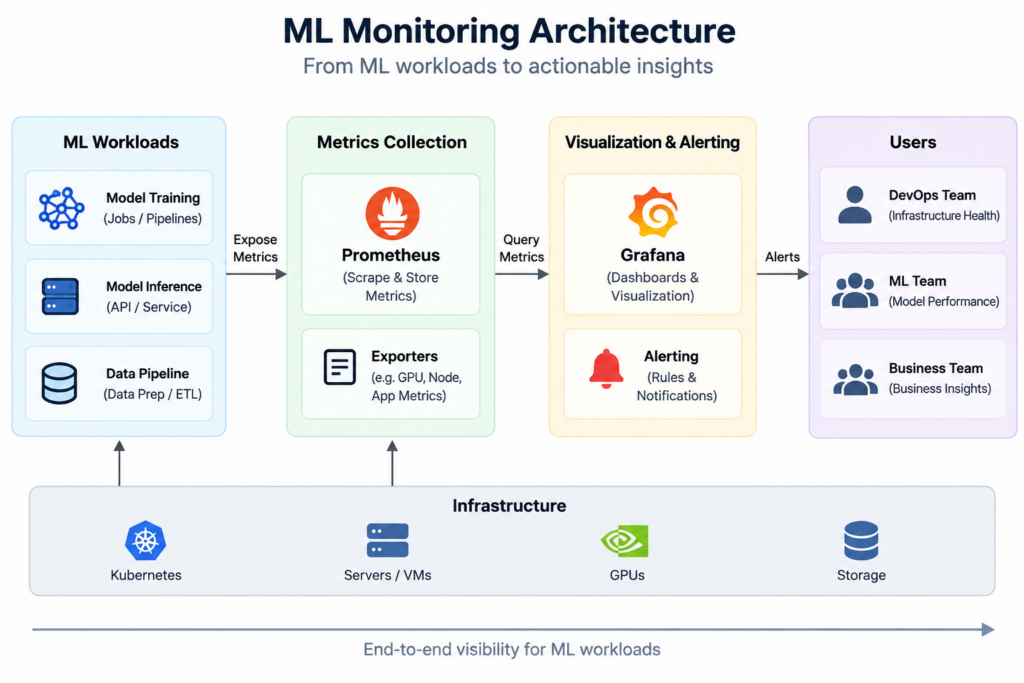
A practical ML observability stack keeps Prometheus and Grafana at its center and adds a specific tool for each gap:
| Monitoring requirement | Recommended tool or approach | What to monitor |
|---|---|---|
| GPU telemetry | NVIDIA DCGM Exporter | Utilization, memory, errors, throttling and other supported hardware metrics |
| Inference serving | Triton, KServe or vLLM built-in metrics | Request rate, latency, queueing, failures and serving-specific signals |
| Metrics collection and alerting | Prometheus | Aggregated metrics, recording rules and alert conditions |
| Dashboards and visualization | Grafana | Trends, service health, deployment comparisons and alerts |
| Data and prediction drift | Evidently | Changes in input data, prediction distributions and drift indicators |
| Training experiments | MLflow, Weights & Biases or TensorBoard | Loss, learning rate, epochs and experiment results |
These tools work together. DCGM Exporter and the model server expose metrics that Prometheus scrapes, and your own application adds a few custom metrics. Prometheus evaluates recording and alert rules. Grafana shows GPU health, serving latency and drift summaries side by side, with annotations marking model deployments. Evidently and the delayed evaluation job cover prediction quality, and the experiment tracker covers training runs. Available metric names and labels depend on the server, its version and its configuration, so build dashboards from what your runtime actually exposes.
What to Monitor in Production ML Systems
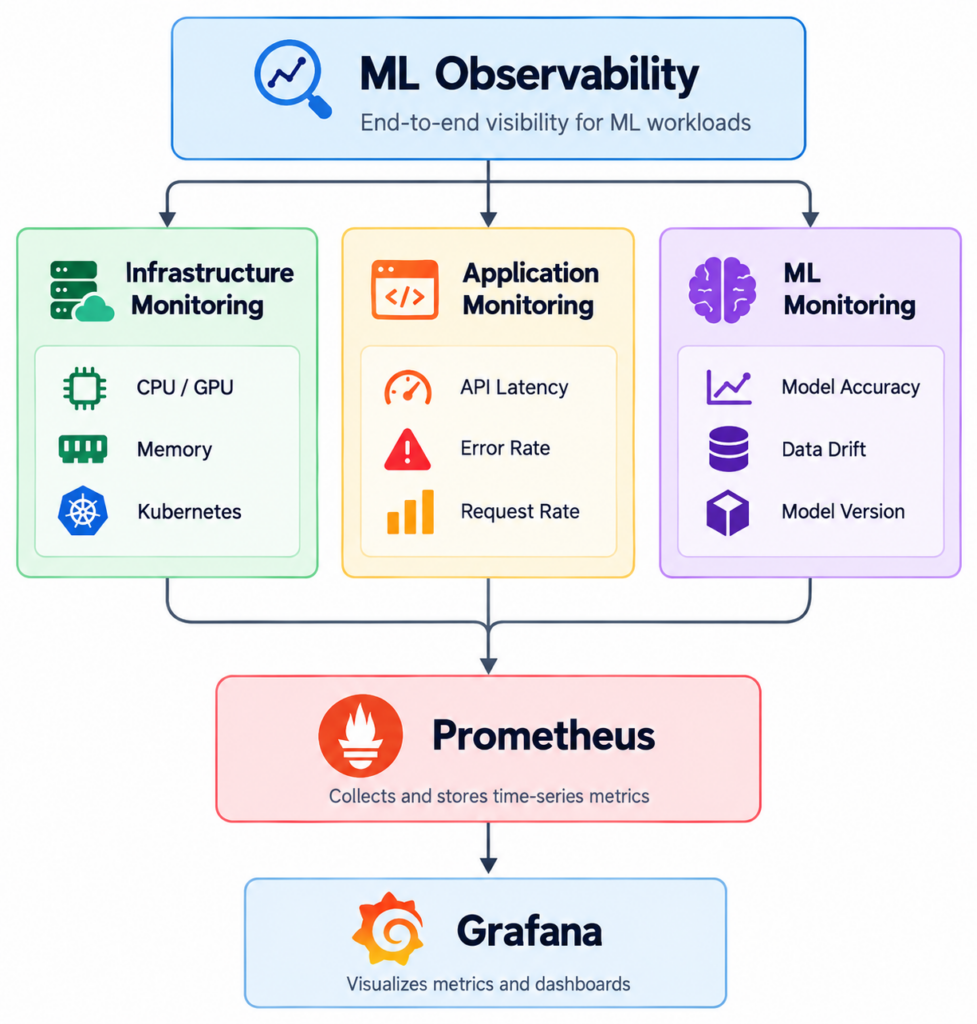
Use this checklist to review an existing setup. The sections that follow show how to implement the most important parts.
1. Infrastructure and GPU Health
Monitor CPU, memory, disk, Kubernetes pods and GPU health. For GPUs, prioritize OOM events, XID and ECC errors, and throttling, and treat utilization and memory allocation as context rather than alert triggers.
2. Application and Inference Performance
Track request rate, error rate, p95 and p99 inference latency, and queue time. These show whether the service meets its latency target and whether users are seeing failures.
3. Model Performance and Data Quality
Track prediction and confidence distributions and data drift in near real time, and calculate real accuracy once ground-truth labels arrive.
4. Model Version and Deployment Health
Track the deployed model version, model loading status and deployment changes, so you can tell whether a problem started with a new model.
5. Alerts and Resource Optimization
Alert on SLO breaches, error rates, queue growth and hardware errors. Use GPU utilization and memory trends for capacity planning and cost optimization rather than paging.
Practical PromQL Queries for ML Monitoring
The first two queries use illustrative application metrics, inference_request_duration_seconds (a histogram) and inference_requests_total (a counter), which are defined in the Python example in the next section. Your actual metric names depend on your serving system and instrumentation.
1. p95 inference latency per model version
histogram_quantile(
  0.95,
  sum by (le, model_version) (
    rate(inference_request_duration_seconds_bucket[5m])
  )
)
This calculates the 95th-percentile latency over the last five minutes for each model version, using histogram_quantile. The le label must be kept in the sum by clause because it identifies the histogram buckets. Use 0.99 for p99. Accuracy depends on your bucket boundaries, so include a bucket at or near your latency SLO.
2. Error rate by model version
sum by (model_version) (rate(inference_requests_total{status="error"}[5m]))
/
sum by (model_version) (rate(inference_requests_total[5m]))
This returns the fraction of requests that failed in the last five minutes for each model version. A new version with a higher error rate than the previous one is a strong signal to pause or roll back a rollout.
3. Queueing and saturation
# Requests waiting in the vLLM scheduler queue (gauge)
max by (model_name) (vllm:num_requests_waiting)

# Average time a request spends queued in Triton, in milliseconds
sum by (model, version) (rate(nv_inference_queue_duration_us[5m]))
/
sum by (model, version) (rate(nv_inference_request_success[5m]))
/ 1000
These use built-in serving metrics. The first query shows how many requests are waiting in the vLLM scheduler, and the second estimates the average time a successful request spends in the Triton queue. A queue that keeps growing while GPU utilization is already high means the service is saturated and needs more capacity or better batching. Check the metric names against the version you run.
Instrumenting Python Model Inference
If you serve a model with your own Python code, the official Prometheus Python client adds the metrics used above in a few lines. The example below counts requests by outcome, records inference duration in a histogram, and uses a bounded model_version label.
from prometheus_client import Counter, Histogram, start_http_server

# Read this from deployment config (for example, an environment variable).
MODEL_VERSION = "v2"

INFERENCE_REQUESTS = Counter(
    "inference_requests_total",
    "Inference requests by model version and outcome.",
    ["model_version", "status"],  # status is only "success" or "error"
)

INFERENCE_LATENCY = Histogram(
    "inference_request_duration_seconds",
    "Time spent running model inference, in seconds.",
    ["model_version"],
    buckets=(0.01, 0.025, 0.05, 0.1, 0.25, 0.5, 1.0, 2.5, 5.0),
)


def predict(model, features):
    with INFERENCE_LATENCY.labels(model_version=MODEL_VERSION).time():
        try:
            result = model.predict(features)  # your model call
        except Exception:
            INFERENCE_REQUESTS.labels(model_version=MODEL_VERSION, status="error").inc()
            raise
    INFERENCE_REQUESTS.labels(model_version=MODEL_VERSION, status="success").inc()
    return result


if __name__ == "__main__":
    start_http_server(8000)  # serves /metrics on port 8000
    # ...then start your web framework or worker loop as usual.
A few details matter here. Metric names use base units (seconds) and the _total suffix for counters, following the Prometheus naming conventions. The status label has only two values, and the exception message is never used as a label. The histogram buckets should be adjusted to your latency targets. This instrumentation complements, rather than replaces, the metrics that Triton, KServe or vLLM already expose; use it for application-level timings and signals the server cannot see.
Prometheus Alert Rules for Model Serving
The following Prometheus alerting rules use the same illustrative metrics. They are examples to adapt, not production defaults.
groups:
  - name: model-serving
    rules:
      - alert: InferenceLatencyP95High
        expr: |
          histogram_quantile(
            0.95,
            sum by (le, model_version) (
              rate(inference_request_duration_seconds_bucket[5m])
            )
          ) > 0.5
        for: 10m
        labels:
          severity: warning
        annotations:
          summary: "p95 inference latency above 500 ms ({{ $labels.model_version }})"
          description: "p95 latency is {{ $value | humanizeDuration }}. Check queueing, batching and GPU throttling."

      - alert: InferenceErrorRateHigh
        expr: |
          (
            sum by (model_version) (rate(inference_requests_total{status="error"}[5m]))
            /
            sum by (model_version) (rate(inference_requests_total[5m]))
          ) > 0.02
          and
          sum by (model_version) (rate(inference_requests_total[5m])) > 0.1
        for: 10m
        labels:
          severity: critical
        annotations:
          summary: "Inference error rate above 2% ({{ $labels.model_version }})"
          description: "{{ $value | humanizePercentage }} of inference requests are failing."
The first rule fires when p95 latency for a model version stays above 500 ms for ten minutes. The second fires when more than 2% of requests fail for ten minutes, but only when the version receives meaningful traffic, which avoids noisy alerts on idle versions. The for clause filters out short spikes.
The thresholds here are placeholders. A real-time fraud model and a batch document classifier need very different limits, so set thresholds from each model’s SLO and observed workload. Alert on user impact and hardware faults rather than high GPU utilization or memory allocation. If you manage alerts in Grafana instead, the same queries work with Grafana Alerting.
ML Monitoring Do’s and Don’ts
Do
- Monitor p95 and p99 inference latency.
- Track request throughput and error rates.
- Compare metrics by bounded labels such as
model_version. - Monitor GPU errors and throttling indicators.
- Track prediction distributions and data drift.
- Add Grafana annotations for model deployments and configuration changes.
- Set workload-specific SLOs.
- Keep infrastructure metrics separate from training experiment metrics.
Don’t
- Treat high GPU utilization as an automatic failure.
- Alert on high GPU memory allocation alone.
- Use averages as the only latency indicator.
- Add user IDs, request IDs, session IDs or raw input values as Prometheus labels.
- Assume healthy infrastructure means the model is making correct predictions.
- Assume prediction drift automatically proves that accuracy has dropped.
Frequently Asked Questions
Can Prometheus monitor GPUs?
Yes, through an exporter. Prometheus collects GPU metrics that an exporter such as NVIDIA DCGM Exporter exposes. Prometheus stores and queries the data; the exporter and DCGM do the actual GPU telemetry collection.
Is high GPU utilization always a problem?
No. High utilization often means the GPU is being used efficiently. It only indicates a problem when it appears together with rising latency, growing queues, falling throughput or hardware errors.
Can Prometheus detect ML model drift?
Partly. Prometheus can track aggregated proxy signals, such as prediction counts per class or confidence-score histograms, if your application exposes them. Statistical drift analysis against a reference dataset usually needs extra instrumentation or a dedicated tool such as Evidently.
Which metrics should I monitor for production inference?
Start with p95 and p99 latency, request rate, error rate and queue time per model version. Add GPU health (errors, throttling, OOM events) and prediction-quality signals such as prediction distributions and drift.
How should I monitor model accuracy when labels arrive late?
Watch proxy signals such as prediction, confidence and input distributions in the meantime. Log predictions with their model version and an ID, then run a scheduled job that joins them with ground-truth labels when they arrive and calculates real accuracy per model version.
Conclusion: Back to the Green Dashboard
Go back to the opening scenario: CPU at 30%, healthy pods, green dashboards, and users complaining about slow and less accurate predictions. With the signals described above, the investigation looks very different.
The p95 and p99 latency panels would show the slowdown directly, instead of relying on user complaints. Queue metrics from the model server would show whether requests are waiting because the service is saturated. DCGM metrics would show whether the GPUs are throttling or reporting XID or ECC errors. Comparing latency and error rates by model_version, with a Grafana annotation at the last deployment, would show whether the problem started with a new model. Prediction and confidence distributions, along with Evidently drift reports, would show whether production data has shifted, and the delayed evaluation job would later confirm whether accuracy really dropped.
No single metric would necessarily reveal the root cause. Together, they narrow the search from “everything looks fine” to a few likely explanations. Prometheus and Grafana remain the right foundation. What changes is what you feed them: GPU health, model-serving metrics and data-quality signals alongside the infrastructure metrics you already collect.