
A few years ago, vector databases were something only ML researchers and a few startups used. Today, they are a key part of most AI applications, like search, recommendations, and chatbots using RAG. If you’re working with large language models, the real question is not whether you need a vector database, but how you plan to host and manage it.
How you host it matters more than most people think. If you get it right, your AI runs fast, stays stable, and keeps costs under control. If you get it wrong, you may end up paying too much or struggling with slow performance when your app scales.
This guide explains the most common ways to host a vector database that people actually use in production. It covers everything from running it on your own servers, to using cloud platforms like Amazon Web Services, Microsoft Azure, and Google Cloud Platform, to fully managed services where you don’t have to handle the setup or maintenance.
For each option, you’ll see how it works, when it makes sense, and what to be careful about.
Whether you’re deciding this for the first time or thinking of changing your current setup, this will help you choose with clarity.
What Is a Vector Database?
To understand why hosting a vector database is different from a normal database, you first need to know what it actually does behind the scenes.
A vector database is built to store and search vectors. A vector is just a list of numbers, often hundreds or thousands, that represent the meaning of data. This data can be text, images, audio, or video. These are converted into vectors using models called embedding models.
For example, when you pass a sentence through an embedding model like text-embedding-ada-002 or a transformer from Hugging Face, you get a vector with many numbers. This vector captures the meaning of that sentence.
The key idea is simple. Sentences with similar meaning end up close to each other in this number space, even if the words are different.
Core Components of a Vector Database
A vector database mainly does three important things:
- Storage: It stores vectors along with their metadata in a reliable way, and lets you update or delete them as your data changes.
- Indexing: It builds smart structures to make searches fast. Without this, the system would have to compare every vector one by one, which is very slow. Methods like Hierarchical Navigable Small World and Inverted File Index help speed this up by reducing the search space.
- Querying: It takes a query vector and returns the most similar results, often with filters like “only show results from a specific category”.
Most vector databases also support hybrid search. This mixes keyword search like BM25 with vector search, so you get both exact matches and meaning-based results together.
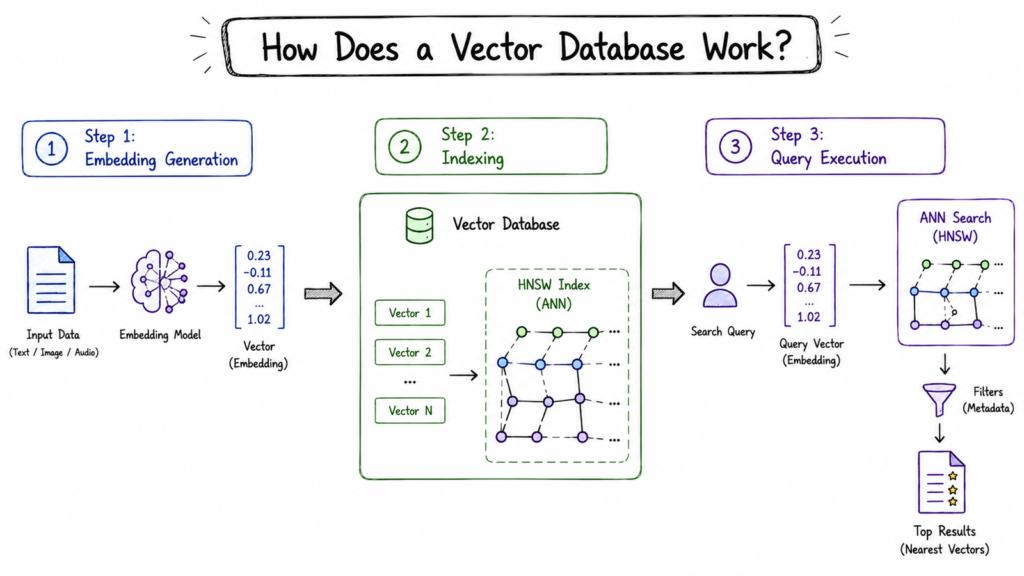
How Does a Vector Database Work?
Let’s follow how data moves through a vector database so the infrastructure part becomes easier to understand.
Step 1: Embedding Generation
Before storing anything, your data needs to be turned into a vector. This happens outside the database. You send text, image, or audio to an embedding model, and it returns a list of numbers that represents its meaning. This happens both when you add data and when a user searches.
The model you choose matters. It decides how big the vector is and how well it captures meaning. For example, text-embedding-ada-002 uses 1,536 numbers, while models from Hugging Face may use 384.
More dimensions usually mean better accuracy, but they also increase memory and compute cost.
Step 2: Indexing
When you add a vector, it is placed into an index built for fast similarity search. The most common type is Hierarchical Navigable Small World, which uses a layered graph to quickly move toward similar vectors instead of checking everything.
Building this index takes a lot of compute and memory. For example, a billion-vector HNSW index can need 200 to 400 GB of RAM. That is why memory matters so much when hosting a vector database, not just CPU.
Step 3: Query Execution
When a user searches, the app turns the query into an embedding and sends it to the vector database. The database quickly compares it with stored data, finds the closest matches, applies filters, and returns the best results, usually in under 100 milliseconds if set up well.
All of this needs to happen fast so the user feels no delay. That is why it matters where your database is hosted and whether your data fits in memory.
What Problem Does a Vector Database Solve?
Before vector databases, semantic search was very difficult to build. You could use keyword search, which is fast but cannot understand meaning, or use machine learning models to compare results in real time, which is flexible but too slow at scale. There was no good balance between the two.
Vector databases fix this problem. They make it fast and practical to search based on meaning, even at large scale. Here is what that makes possible:
1. Semantic Search
Users can search for “affordable places to stay in Tokyo” and still see results for budget hotels in Japan, even if those exact words are not used. Traditional keyword search would miss this. Vector search works because it understands the meaning, so it matches similar ideas even when the words are different.
2. Retrieval-Augmented Generation (RAG)
This is the main use case today. When a user asks a question to a chatbot, the system does not rely only on the model’s training data. It pulls relevant information from a vector database and adds it to the prompt. This helps the chatbot give more accurate answers, especially for specific or company-related knowledge.
Most modern enterprise AI assistants use a vector database as their memory, so the model can fetch the right information when needed.
3. Recommendation Systems
Recommendation systems for products, content, or connections can use vector similarity. A user’s preferences are turned into a vector, and the system finds items that are closest to it. This helps capture subtle preferences that older methods like collaborative filtering often miss.
4. Duplicate Detection and Clustering
Near duplicate detection in documents, images, and code becomes simple with a vector database. If two items have very similar vectors, they are likely duplicates or closely related. This is useful for content moderation, legal reviews, and checking plagiarism in academic work.
Ways to Host a Vector Database
Now that you understand what a vector database is and why it needs strong infrastructure, let’s look at the real hosting options used in production systems today.
1. Bare Metal Servers
Bare metal hosting means running your vector database directly on physical servers with no virtualization layer. You manage the machines, OS, and database yourself. It takes more effort to run, but it gives the best performance and full control over resources. If your index needs large memory, you can dedicate the entire server to it.
How to set it up
- Use servers with high RAM, fast NVMe storage, and modern CPUs. Add GPUs like NVIDIA A100 or NVIDIA H100 if needed
- Install Linux such as Ubuntu 24.04 LTS or Red Hat Enterprise Linux
- Deploy a vector database like Milvus, Qdrant, or Weaviate
- Run at least 3 nodes for high availability
- Store data on NVMe disks and take regular backups
- Monitor using Prometheus and Grafana
Hardware sizing basics
- RAM is most important. If data does not fit in memory, performance drops
- Use NVMe SSDs for active data
- CPUs with AVX-512 improve speed
- Use at least 10 Gb network between nodes
When to use it
- Very large datasets where managed services are too expensive
- Need stable and predictable latency
- Strict compliance needs physical hardware
- Strong infra team available
2. Virtual Machines (Self Managed)
Virtual machines give you control like bare metal but with the flexibility of the cloud. You create VMs on providers like Amazon Web Services, Microsoft Azure, or Google Cloud Platform, or use tools like VMware or KVM. You install and manage the vector database and the full software stack yourself.
This is the most common self hosted approach today. It gives a good balance of control, cost, and ease compared to bare metal.
Deployment Patterns for Vector Databases on Virtual Machines
A. Single-Node Deployment
For smaller datasets, development environments, or non-critical workloads, a single high-memory virtual machine (VM) can efficiently host an entire vector database instance. This deployment model is operationally simple and cost-effective for workloads that do not require high availability or distributed scaling.
Memory-optimized VM families are generally the best fit for vector databases because vector indexes are highly RAM-intensive. Suitable examples include:
- AWS R7i instances
- Azure Edsv5 series
- Google Cloud M3 series
As an example, an AWS r7i.8xlarge instance with approximately 256 GB RAM can comfortably support Qdrant or Weaviate deployments handling tens of millions of vectors, depending on vector dimensionality, indexing strategy, and replication settings.
This approach is commonly used for:
- Internal AI applications
- Proof-of-concept deployments
- Development and staging environments
- Small to medium production workloads with limited availability requirements

B. Multi-Node Cluster Deployment
For production-grade systems requiring high availability, fault tolerance, and horizontal scalability, vector databases are typically deployed as multi-node clusters across multiple availability zones.
The most common architecture consists of:
- Three or more VM nodes
- Kubernetes (K8s) orchestration
- Persistent SSD-backed storage
- Automated replication and failover
Most modern vector databases provide official Helm charts for Kubernetes deployment, significantly simplifying cluster provisioning and lifecycle management.
Milvus on VMs
Milvus uses a distributed architecture with multiple infrastructure dependencies, including:
- etcd for metadata coordination
- MinIO or S3-compatible storage for object persistence
- Pulsar or Kafka (depending on configuration) for messaging
This architecture is highly scalable and well-suited for large enterprise workloads, although it introduces additional operational complexity compared to lighter-weight vector databases.
Qdrant on VMs
Qdrant offers a comparatively lightweight operational model. It can run as:
- A standalone binary
- A Docker container
- A distributed cluster with built-in replication and consensus management
Qdrant uses a distributed consensus mechanism based on the Raft protocol for cluster coordination, making it easier to operate than many traditional distributed databases while still supporting horizontal scaling and fault tolerance.
This makes Qdrant particularly attractive for teams that want production scalability without managing a large distributed systems stack.
Key Infrastructure Considerations
- Choose memory-optimized VMs: Vector databases rely heavily on RAM for fast searches. Using memory-optimized instances helps deliver better performance and avoids overpaying for unused CPU resources.
- Use high-performance SSD storage: Store indexes on high-IOPS SSDs such as AWS io2, Azure Premium SSD v2, or GCP Hyperdisk Extreme. Standard boot disks are not ideal for production workloads.
- Leverage local NVMe storage for caching: Instance-store NVMe drives, available on VM families such as AWS i3 and i4i, provide extremely fast temporary storage that can improve query performance. Keep in mind that this data is lost if the instance is stopped or terminated.
- Automate backups and snapshots: Schedule regular snapshots to object storage and periodically test restoration procedures to ensure reliable disaster recovery.
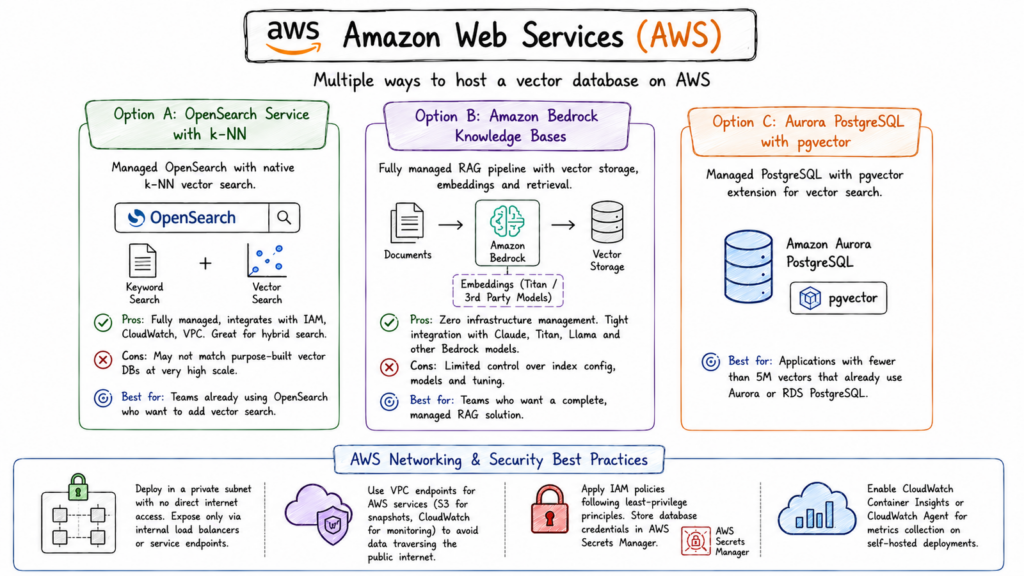
3. Amazon Web Services (AWS)
AWS offers multiple paths to hosting a vector database, ranging from full self-management to fully managed services. This flexibility is one of AWS’s strengths you can start with a managed service and migrate to a self-managed setup as your needs evolve, staying entirely within the AWS ecosystem.
A: Amazon OpenSearch Service with k-NN
AWS’s managed OpenSearch Service supports k-NN vector search natively, using FAISS or NMSLIB as the underlying ANN engine. If you’re already using OpenSearch for full-text search, adding vector search requires only enabling the k-NN plugin and creating vector field mappings.
- Pros: Fully managed, integrates tightly with AWS IAM, CloudWatch, and VPC. If you need hybrid search (vector + keyword), this is a very natural fit.
- Cons: OpenSearch’s k-NN performance doesn’t match purpose-built vector databases at very high query volumes. It’s excellent for moderate workloads but can be outperformed by Qdrant or Milvus at scale.
Best for: Teams already running OpenSearch for search who want to add vector search without introducing a new service.
B: Amazon Bedrock Knowledge Bases
For teams building RAG applications, Amazon Bedrock’s Knowledge Bases feature provides a fully managed RAG pipeline that includes vector storage (backed by OpenSearch Serverless or Aurora PostgreSQL with pgvector), embedding generation (using Amazon Titan or third-party models), and retrieval all wired together through a managed API.
- Pros: Zero infrastructure management. You upload documents, Bedrock handles embedding and indexing. Tight integration with Claude, Titan, Llama, and other Bedrock models.
- Cons: Limited control over vector index configuration, embedding model choice, and query tuning. Works well for standard RAG but constrains custom workflows.
Best for: Teams who want a complete, managed RAG solution without thinking about infrastructure at all.
C. Aurora PostgreSQL with pgvector
Amazon Aurora PostgreSQL supports the pgvector extension, giving you vector search capabilities on a managed, highly available PostgreSQL cluster. Aurora Serverless v2 scales automatically, making it appropriate for variable workloads.
- Best for: Applications with fewer than 5M vectors that already use Aurora or RDS PostgreSQL and want the simplicity of vector search in the same database.
AWS Networking and Security
Regardless of which AWS vector database approach you use, follow these non-negotiable practices:
- Deploy the database in a private subnet with no direct internet access. Expose it only via internal load balancers or service endpoints.
- Use VPC endpoints for AWS services (S3 for snapshots, CloudWatch for monitoring) to avoid data traversing the public internet.
- Apply IAM policies following least-privilege principles. Database credentials should be stored in AWS Secrets Manager, not in environment variables.
- Enable CloudWatch Container Insights or CloudWatch Agent for metrics collection on self-hosted deployments.
4. Microsoft Azure
Azure has invested heavily in AI infrastructure and offers a comprehensive set of options for vector database hosting. Its strongest differentiator is deep integration with Azure OpenAI Service and the broader Microsoft AI ecosystem.
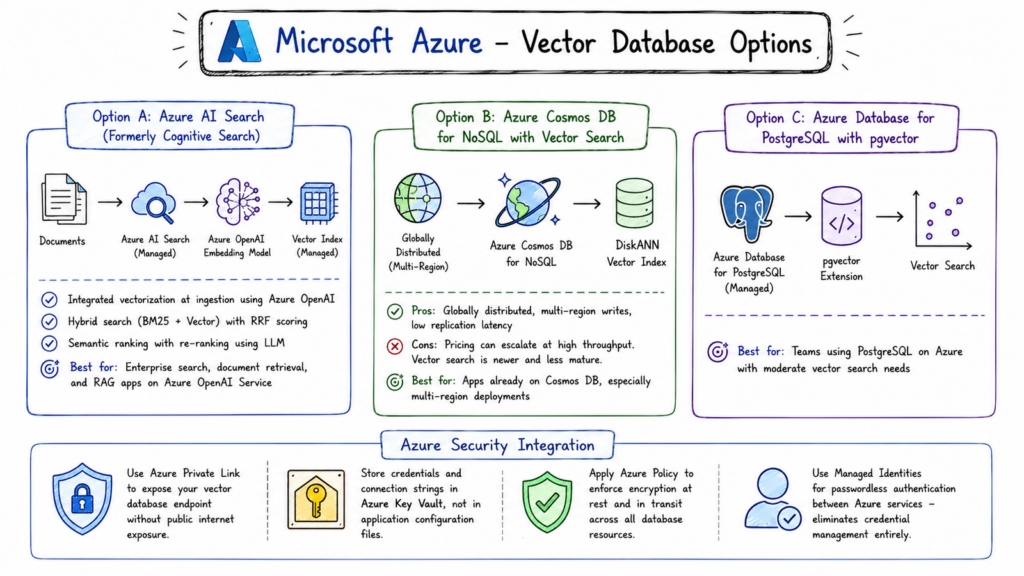
A: Azure AI Search (Formerly Cognitive Search)
Azure AI Search is Microsoft’s managed search service with native vector search support. It handles indexing, sharding, and scaling automatically, and integrates directly with Azure OpenAI Service for automatic vectorization at ingestion time.
- Integrated vectorization: Configure an Azure OpenAI embedding model as a skill, and Azure AI Search will automatically generate embeddings for your documents as they’re indexed. You don’t manage the embedding pipeline separately.
- Hybrid search: Built-in support for combining BM25 keyword search with vector search, with RRF (Reciprocal Rank Fusion) scoring. This is one of the better hybrid search implementations among managed services.
- Semantic ranking: An additional re-ranking step using a hosted language model to re-score results for semantic relevance. Useful for document search applications.
Best for: Organizations in the Microsoft ecosystem building enterprise search, document retrieval, or RAG applications on top of Azure OpenAI Service.
B: Azure Cosmos DB for NoSQL with Vector Search
Microsoft has added DiskANN-based vector search to Azure Cosmos DB for NoSQL. DiskANN is a particularly interesting index type because it’s designed to store the index on disk rather than entirely in RAM, making it cost-effective for very large datasets.
- Pros: Globally distributed by default, with multi-region write support. If you need vector search across multiple geographies with low replication latency, Cosmos DB is hard to beat.
- Cons: Cosmos DB pricing can escalate quickly at high throughput. The vector search implementation is newer and less mature than dedicated vector databases.
Best for: Applications already using Cosmos DB that want to add vector search without a new service, particularly multi-region deployments.
C: Azure Database for PostgreSQL with pgvector
Azure’s managed PostgreSQL service supports the pgvector extension. For teams with moderate vector needs already using PostgreSQL on Azure, this is the path of least resistance.
Azure Security Integration
Azure’s security integrations for vector database deployments:
- Use Azure Private Link to expose your vector database endpoint without public internet exposure.
- Store credentials and connection strings in Azure Key Vault, not in application configuration files.
- Apply Azure Policy to enforce encryption at rest and in transit across all database resources.
- Use Managed Identities for passwordless authentication between Azure services eliminates credential management entirely for Azure-internal service communication.
5. Google Cloud Platform
Google has a unique position in the AI and vector database landscape: its researchers invented the HNSW and ScaNN algorithms that power much of modern vector search, and GCP’s managed AI infrastructure reflects that deep expertise
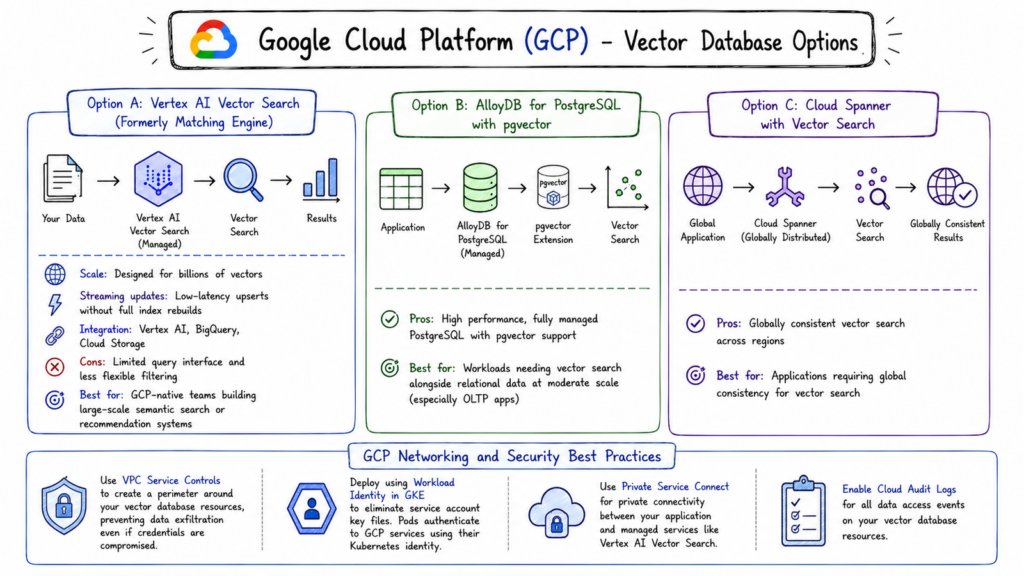
A: Vertex AI Vector Search (Formerly Matching Engine)
Vertex AI Vector Search is Google’s managed, large-scale vector search service. It’s backed by Google’s internal ScaNN (Scalable Approximate Nearest Neighbors) library the same technology that powers Search, YouTube, and Google Photos at planet scale.
- Scale: Vertex AI Vector Search is genuinely designed for billions of vectors. It’s one of the few managed services where you don’t need to worry about whether it can handle your data volume.
- Streaming updates: Supports low-latency upserts (adding or updating vectors) without full index rebuilds something that many vector databases struggle with at scale.
- Integration: Tight integration with Vertex AI pipelines, BigQuery (for mixed analytics and search workloads), and Cloud Storage for bulk data loading.
- Cons: The query interface is more limited than purpose-built vector databases. Complex metadata filtering and advanced query options are less flexible than Milvus or Weaviate.
Best for: GCP-native teams building large-scale semantic search or recommendation systems who want a fully managed solution integrated with the Vertex AI ecosystem.
B: AlloyDB for PostgreSQL with pgvector
AlloyDB is Google’s fully managed PostgreSQL-compatible database, built on a custom storage engine designed for high throughput. It supports pgvector with some optimizations for query performance beyond standard PostgreSQL.
For teams running workloads on GCP that need vector search at moderate scale alongside relational data, AlloyDB with pgvector is a strong option especially for OLTP applications that need vector search as a feature rather than as the core workload.
C: Cloud Spanner with Vector Search
Google has added vector search capabilities to Cloud Spanner, its globally distributed relational database. This is particularly relevant for applications that need globally consistent vector search across regions a use case very few other services support well.
GCP Networking and Security
- Use VPC Service Controls to create a perimeter around your vector database resources, preventing data exfiltration even if credentials are compromised.
- Deploy using Workload Identity in GKE to eliminate service account key files entirely pods authenticate to GCP services using their Kubernetes identity.
- Use Private Service Connect for private connectivity between your application and managed services like Vertex AI Vector Search.
- Enable Cloud Audit Logs for all data access events on your vector database resources.
Choosing the Right Approach
No single hosting model is universally correct. Here’s the framework to narrow it down:
How large is your dataset and how fast is it growing?
Under 10M vectors, almost any approach works. Over 100M vectors, you need to think carefully about memory, storage I/O, and clustering.
Do you have infrastructure engineers on the team?
Self-hosting on VMs or bare metal requires ongoing operational investment. Without that capacity, managed services are almost always the better choice.
What are your compliance requirements?
HIPAA, FedRAMP, or strict data residency requirements may restrict which cloud regions or services you can use, and may mandate self-managed deployments.
Which cloud are you primarily on?
Staying within one provider’s ecosystem simplifies networking, security, and billing. AWS, Azure, and GCP each have native vector search options that integrate tightly with their other services.
What are your latency requirements?
Sub-10ms queries require co-locating the application and database in the same region and availability zone. Serverless and cross-region setups introduce latency that may be unacceptable for user-facing features.
What’s your time-to-production requirement?
A managed service can be running in production today. A self-hosted bare metal cluster might take weeks to properly provision and harden.