



TechAnek

Upgrading Amazon EKS clusters is one of the most critical operational tasks for Kubernetes administrators, requiring meticulous planning, comprehensive testing and careful execution. Unlike traditional infrastructure upgrades where a simple reboot might suffice, EKS cluster upgrades involve coordinating multiple components across the control plane and data plane while maintaining application availability and data consistency. This blog provides a detailed guide to upgrading EKS clusters following industry best practices, ensuring minimal disruption and maximum reliability.

Understanding the EKS Upgrade Architecture

Amazon EKS clusters consist of two logical layers: the control plane and the data plane. The control plane which includes the API server, etcd, controller manager, scheduler and webhooks is managed and upgraded by AWS. Your responsibility as a cluster administrator encompasses upgrading the data plane, which includes worker nodes, Fargate pods, cluster add-ons and any custom controllers you’ve deployed. Understanding this shared responsibility model is fundamental to planning a successful upgrade.​

One of the most important constraints to remember is that EKS supports only incremental upgrades of one minor version at a time. This means if your cluster runs Kubernetes 1.24 and you need to reach 1.27, you must follow the path 1.24 → 1.25 → 1.26 → 1.27. Attempting to skip versions will fail and each intermediate upgrade must complete successfully before proceeding to the next. This constraint, while seemingly restrictive, actually protects your cluster by preventing incompatibilities and ensuring thorough validation at each step.​

Kubernetes follows an N-2 support policy, meaning AWS actively supports the three most recent minor versions. Each release receives 14 months of support 12 months of active patch releases and 2 additional months for the upgrade period. This policy provides ample time to plan and execute upgrades without rushing into production changes.

Pre-Upgrade Planning and Assessment

The pre-upgrade phase is absolutely critical and often determines whether your upgrade succeeds smoothly or encounters significant issues. This phase should never be rushed or abbreviated, regardless of how experienced your team is.

Review Release Notes and Kubernetes Changes:

Begin by thoroughly examining the release notes for the target Kubernetes version. AWS publishes comprehensive documentation detailing what has changed, what has been deprecated and what has been removed. The Kubernetes community follows a documented deprecation policy where stable APIs must remain supported for at least one year after being marked as deprecated, beta APIs for three releases and alpha APIs can be removed without notice. Understanding these changes allows you to identify potential compatibility issues with your applications before attempting the upgrade.

Enable AWS EKS Upgrade Insights: 

AWS provides a built-in feature called EKS Upgrade Insights that analyzes your cluster for potential upgrade issues. This feature examines audit logs over a 30-day rolling window to identify deprecated API usage, checks add-on compatibility with the target version and flags unsupported Kubernetes objects that may cause issues post-upgrade. Running Upgrade Insights is not optional, it should be a mandatory step in your pre-upgrade checklist. However, be aware that insights maintain a 30-day historical window, so fixing deprecated API usage will only clear the error after the original audit log entry falls outside this window.​

Verify Basic Infrastructure Requirements:

Before initiating any upgrade, confirm that your cluster meets fundamental prerequisites. AWS requires up to five available IP addresses from the subnets specified during cluster creation for the control plane upgrade process. If your cluster uses AWS KMS encryption for secrets, verify that the cluster’s IAM role has permissions to use the KMS key. Check that the control plane IAM role is still present in your account with the necessary permissions. Many upgrade failures stem from missing prerequisites rather than incompatibilities, making this validation essential.

Test in a Staging Environment First:

Always perform an upgrade in a staging environment that mirrors your production cluster before upgrading production. This staging cluster should have similar node types, regions, networking policies and core workloads. Running integration tests, load tests and disaster recovery simulations in staging reveals approximately 95% of potential issues before they impact production users. The cost of maintaining a staging cluster is negligible compared to the cost of production downtime.

Implementing a Comprehensive Backup Strategy

Backup everything before starting the upgrade, this mantra cannot be overemphasized. Unlike software deployments where rollback is often straightforward, Kubernetes control plane upgrades are generally irreversible. If something goes wrong, your only option may be to recreate the environment or fix issues in place.​
A comprehensive EKS backup strategy should cover five distinct levels:

Cluster-Level Backup: 

Use tools like Velero, eksctl or AWS Backup to create point-in-time snapshots of your entire cluster. These backups should capture cluster metadata, all deployed resources and configuration. Store these backups in encrypted S3 buckets with tight IAM access controls.​

Workload Backup:

Export all Kubernetes manifests including Deployments, StatefulSets, DaemonSets and other workload definitions. Use kubectl get all --all-namespaces -o yaml to capture your current workload state.

				
					kubectl get ns -o yaml > namespaces-backup.yaml
kubectl get svc,ingress --all-namespaces -o yaml > services-ingress-backup.yaml
kubectl get all --all-namespaces -o yaml > workloads-backup.yaml
kubectl get configmap --all-namespaces -o yaml > configmaps-backup.yaml
kubectl get secret --all-namespaces -o yaml > secrets-backup.yaml
kubectl get pvc --all-namespaces -o yaml > pvc-backup.yaml
kubectl get pv -o yaml > pv-backup.yaml
kubectl get crd -o yaml > crds-backup.yaml
kubectl get roles,rolebindings,clusterroles,clusterrolebindings --all-namespaces -o yaml > rbac-backup.yaml
				
			
  • Save the Backup Files:
				
					tar -czvf kubernetes-backup.tar.gz *.yaml helm-backup/


Persistent Data Backup:

Backup all Persistent Volume Claims (PVCs) and Persistent Volumes (PVs), as well as underlying EBS volumes and EFS file systems. For stateful applications, this is often the most critical backup.

After creating backups, periodically test the restore process to ensure backups are valid and restorable. A backup that cannot be restored is essentially worthless.

The Upgrade Sequence: Ordering Matters

The order in which you upgrade EKS components is not arbitrary, it follows a carefully designed sequence to maintain stability and compatibility. Upgrading components out of order is a common source of upgrade failures.

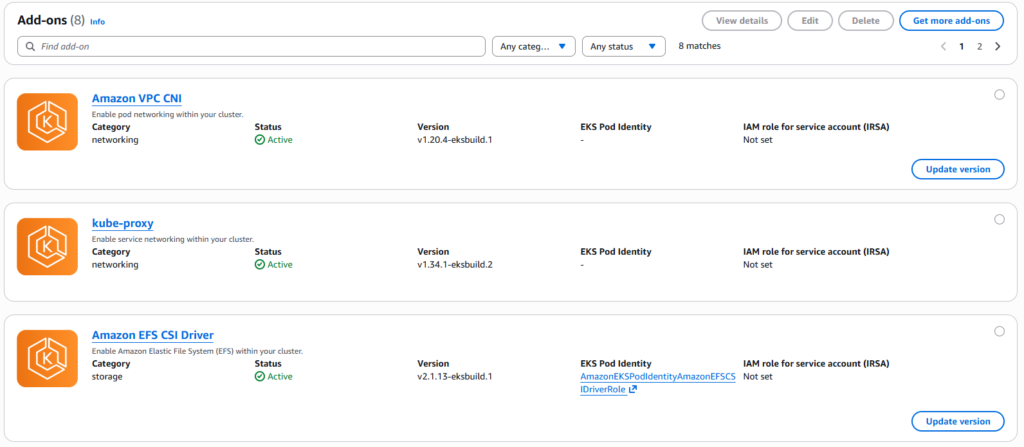
Before touching the control plane, upgrade essential cluster add-ons including the Amazon VPC CNI (Container Networking Interface), kube-proxy and CoreDNS. These add-ons provide critical networking and DNS functionality. Upgrading them first ensures they’re compatible with your current cluster version before you upgrade the control plane. Use the AWS Console or CLI to upgrade add-ons, as they must be managed through the EKS API and respect specific version compatibility requirements.

Step 1: Upgrade EKS Add-ons First:

Steps to Upgrade Add-ons:

  1. Go to AWS Console > EKS > Your Cluster
  2. Click on the Add-ons tab
  3. Locate the following add-ons: Amazon VPC CNI, KubeProxy, CoreDNS
  4. Check if an update is available
  5. Click Update for each add-on
  6. Follow the update wizard and confirm

Verify Add-ons Are Running:

				
					kubectl get pods -n kube-system


Step 2: Upgrade the Control Plane:

After add-ons are updated and verified, upgrade the control plane to the target Kubernetes version. AWS manages this upgrade process, but you trigger it through the AWS Console, CLI or Terraform. During control plane upgrade, the API servers are updated in a rolling manner to maintain availability. However, plan for brief periods where API requests might experience increased latency.

After add-ons are updated and verified, upgrade the control plane to the target Kubernetes version. AWS manages this upgrade process, but you trigger it through the AWS Console, CLI or Terraform. During control plane upgrade, the API servers are updated in a rolling manner to maintain availability. However, plan for brief periods where API requests might experience increased latency.

Check Upgrade Insights:

  • In the AWS Console, navigate to EKS > Your Cluster > Upgrade Insights.
  • The upgrade insights provide details on potential issues that might affect the upgrade.
  • If any insights show an error, resolve those issues before proceeding with the upgrade.

Upgrade Insights Details:

Upgrade insights analyze compatibility issues between the existing cluster version and the target version. These
include:

  • Deprecated API usage: Identifies APIs that will be removed or changed.
  • Add-on compatibility: Ensures that CoreDNS, KubeProxy and CNI are compatible with the new version.
  • Unsupported Kubernetes objects: Flags objects that may not function correctly post-upgrade.

⚠️ If there are critical errors, fix them before upgrading.

  1. Go to AWS Console > EKS > Clusters
  2. Select your cluster
  3. Click Update Version
  4. Choose the target version (e.g., from 1.24 to 1.25)
  5. Click Update and wait for the process to complete

Step 3: Upgrade Worker Node Groups:

After the control plane is upgraded and stable, upgrade your worker nodes to the same Kubernetes version. This ensures compatibility between the API server (control plane) and the kubelet running on nodes. AWS Kubernetes documentation specifies that kubelet can be up to three minor versions older than the API server, but best practice is to keep them aligned. For managed node groups, use the AWS Console or CLI to update the node group, which automatically handles the rolling replacement of nodes.

  1. Navigate to AWS Console > EKS > Your Cluster > Compute > Node Groups
  2. Select the node group and click Update Version
  3. Choose the latest Kubernetes-compatible AMI version
  4. Click Update

Step 4: Update Additional Components:

Finally, update kubectl clients, Helm charts, Ingress controllers and any other custom controllers you’ve deployed. These components should be compatible with the new Kubernetes version, but updating them last ensures the core cluster is stable first.

And with that the EKS Upgrade Completed Successfully!

Conclusion

Upgrading EKS clusters involves careful orchestration of multiple components, thorough planning, comprehensive testing and continuous monitoring. Success depends not on following a rigid checklist, but on understanding the underlying principles: maintain application availability through PDBs and proper configurations, validate thoroughly in staging environments, backup everything, sequence components correctly and monitor continuously post-upgrade.

By following these best practices, you transform EKS upgrades from fearsome operations that keep teams up at night into well-understood, repeatable processes that you can execute confidently. The investment in planning, tooling and testing upfront pays dividends through reduced risk, faster deployment and greater overall reliability. Remember that every upgrade is also a learning opportunity, document issues, refine your processes and continuously improve your upgrade procedures with each iteration. As your team gains experience and confidence, you can gradually adopt more aggressive upgrade strategies, but always maintain the fundamental discipline of testing, validation and careful sequencing that ensures cluster stability and application availability.

Leave a Reply

Your email address will not be published. Required fields are marked *