
AI has become the secret weapon for startups helping small teams build smarter products, move faster, and compete with much larger companies. But there’s a side of AI that doesn’t get talked about enough: cost. What starts as a few experiments can quickly turn into a surprisingly large bill once real users, real traffic, and real scale kick in.
Many startups don’t realize they have an AI cost problem until it’s already hurting their margins. The issue isn’t that AI is “too expensive” it’s that without the right controls, costs grow silently in the background. A single poorly designed prompt, an unnecessary model choice, or repeated requests for the same response can drain resources faster than expected.
This blog is a practical guide for founders and engineers who want to use AI wisely, not wastefully. We’ll break down simple, proven strategies to keep AI spending under control without sacrificing performance or user experience so your startup can scale with confidence instead of fear of the next invoice.
How AI Costs Quietly Grow in Early-Stage Startups
For most startups, AI costs don’t feel like a problem in the beginning. During early development, usage is low, experiments are limited, and bills look manageable. A few API calls, some testing, maybe a demo for investors everything seems under control.
The real issue starts when the product begins to grow.
As more users come in, AI features that once felt “cheap” start running constantly in the background. Chatbots respond to every message, summarization runs on every document, embeddings are generated repeatedly, and automated workflows trigger AI calls without anyone actively watching them. Individually, each request looks harmless. Collectively, they add up fast.
What makes this worse is that AI costs scale linearly with usage, but startup growth rarely does. User adoption can jump suddenly, features get reused in unexpected ways, and internal tools start depending on AI more than planned. Without guardrails, costs don’t grow gradually they spike.
Another common reason costs spiral is over-engineering early choices. Many teams default to powerful, expensive models for all tasks, even simple ones. Others don’t set token limits, don’t cache repeated responses, or don’t monitor usage closely. These decisions are rarely intentional; they happen because speed is prioritized over optimization.
By the time founders or engineers notice something is wrong, it’s usually when the invoice arrives. And at that point, the question isn’t “Why is AI expensive?” it’s “Where did all this usage come from?” The truth is, AI cost issues are rarely caused by one big mistake. They come from many small, reasonable decisions that compound as the startup scales.
Understanding AI Costs Before You Try to Control Them
Before you can control AI costs, it’s important to understand where those costs actually come from. Many users assume AI pricing works like traditional software pay a flat fee and use it as much as you want. In reality, AI pricing is closer to utilities like electricity or cloud compute: you pay for what you use.
Every time your product sends a request to an AI model, it generates cost. This includes user facing features like chatbots and recommendations, but also background processes such as summarization, classification, search, and data enrichment. As these calls increase, so does your bill.
Tokens: The Real Unit of Cost
AI models don’t charge by feature or by user. They charge by tokens. A token is a small piece of text roughly a word or part of a word. Both the text you send to the model (input) and the text it generates (output) consume tokens.
This means:
- Longer prompts cost more than shorter ones
- Longer responses increase your bill
- Repeating large chunks of context again and again is expensive

Even small inefficiencies matter. A few extra lines in a prompt may feel insignificant during testing, but at scale, those extra tokens are multiplied across thousands or millions of requests.
Not All Models Cost the Same
Another key driver of AI cost is model choice. More powerful models are more capable, but they are also more expensive per request. Many startups make the mistake of using their most advanced model everywhere simply because it “works best.”
In reality, many tasks don’t need advanced reasoning. Simple classification, formatting, or summarization can often be handled by smaller, faster, and cheaper models with little difference in output quality. Choosing the wrong model for a task can increase costs dramatically without delivering proportional value.
Scale Changes Everything
AI costs often feel reasonable at low usage. With a handful of users, it’s easy to overlook inefficiencies. But as your product grows, those same patterns repeat continuously across users, features, and automated workflows.
What was once a minor expense can quickly become a major line item. This is why understanding how AI pricing works early is critical. Once you know what drives costs, you can design systems that scale responsibly instead of reacting to surprise bills after the fact.
Key Strategies to Reduce AI Costs Without Sacrificing Quality
Once you understand how AI costs work, the next step is learning how to control them intentionally. The goal isn’t to cut corners or limit innovation it’s to design AI usage in a way that scales sustainably as your startup grows.
The most effective AI cost optimizations don’t come from one big change. They come from a combination of small, smart decisions made at different layers of your system. When applied together, these strategies can significantly reduce spend while keeping performance and user experience intact.
Here are the core strategies every startup should know:
1. Token Limits and Prompt Optimization
Controlling AI costs effectively starts right at the prompt itself. If you think of your AI request as a conversation the words you send and the words you get back all cost money. Every extra sentence, example, or repeated context adds up in tokens, and tokens are what you pay for.
Before we dive into specific techniques, remember this: shorter, clearer inputs + focused outputs = lower costs with the same value. This isn’t about limiting intelligence, it’s about eliminating waste.
Here’s how startups can approach token limits and prompt optimization in a practical way:
What Are Token Limits and Why They Matter
Tokens are the billing unit for most AI models: every piece of your request (the prompt) and the model’s response counts toward your spend.
For example:
- A long prompt with multiple system messages and user history uses more tokens.
- An unrestricted model response can generate thousands of tokens that you didn’t really need.
- Sending large context every time, even when only part of it matters drives repeated costs.
So setting token limits means you put sensible boundaries around how much text flows in and out of the model. This prevents runaway usage and keeps costs predictable.
Prompt Optimization: Get Smart Without Extra Tokens
Good prompt design isn’t just about performance it’s about cost efficiency. A few simple habits can make a big difference:
- Trim the Context: Don’t send full histories or unnecessary information. Use summaries or only the relevant slice of data.
- Be Specific and Structured: When you ask a model for a specific task, it tends to produce tighter outputs. Vague prompts often cause long, meandering responses that eat up tokens.
- Control Output Length: Most AI APIs let you define a maximum token limit for the output. Setting a reasonable cap keeps responses from running wild.
- Design for Batch Use: If you need multiple answers, group them into a single request where possible — shorter combined contexts often cost less than many repeated calls.
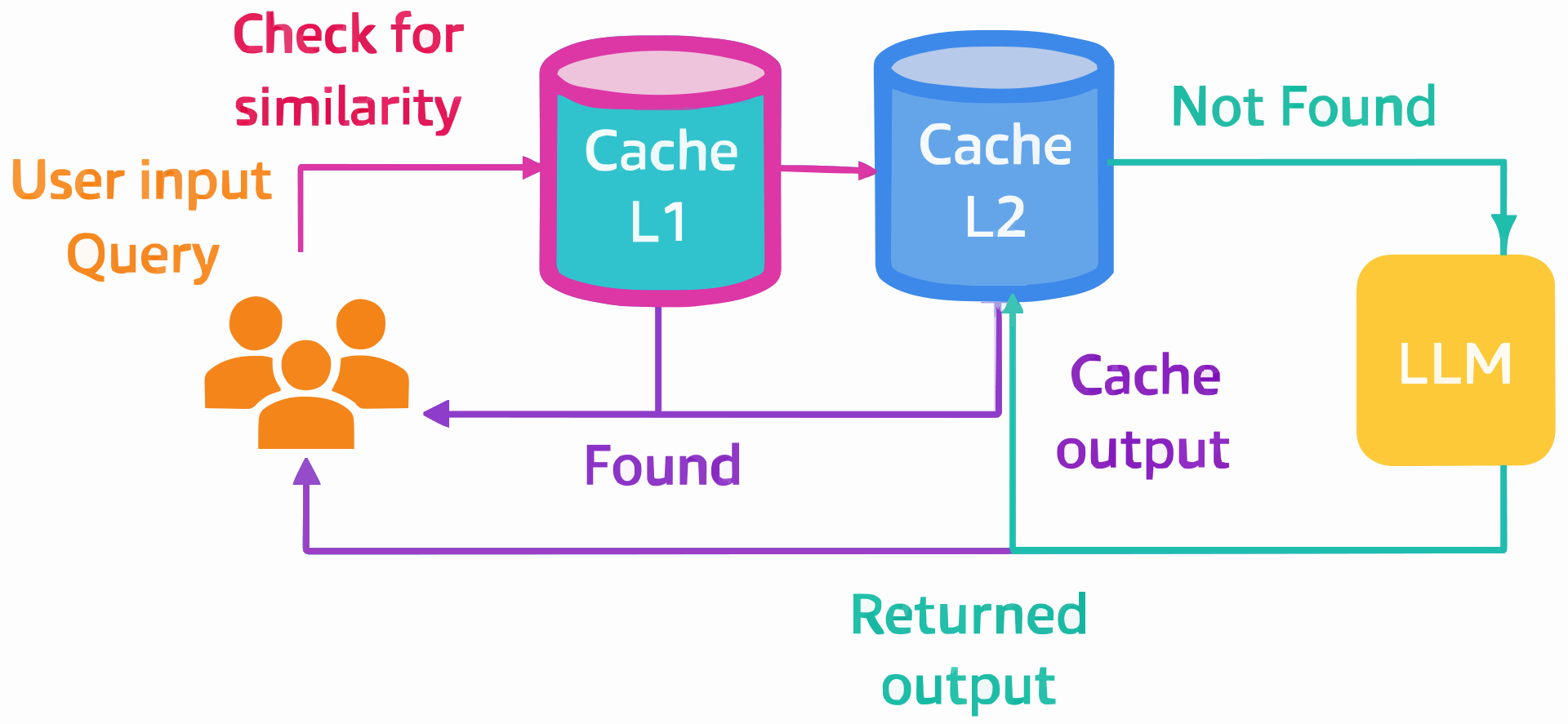
2. Reusing Intelligence: How Caching Cuts AI Costs Instantly
One of the most common reasons AI costs spiral is surprisingly simple: startups pay repeatedly for the same intelligence.
In many products, users ask similar questions, workflows trigger the same summaries, and systems regenerate identical or near-identical responses again and again. Every time this happens without caching, your AI system makes a fresh request and you pay for it again. Caching solves this problem by reusing what you’ve already paid for.
What Caching Means in an AI System:
in simple terms, caching means:
- Storing AI responses after the first request
- Serving the stored response when the same or similar request appears again
- Skipping unnecessary calls to the AI model
Instead of asking the model to “think” every time, your system remembers the answer and reuses it when appropriate. This doesn’t reduce quality. It reduces waste.
Where Caching Works Best:
Caching is especially effective in predictable or repetitive use cases, such as:
- FAQs and help content
- Policy explanations and onboarding guides
- Document summaries
- Product descriptions
- Embeddings for the same documents
- Internal tools used by multiple team members
In these cases, the answer doesn’t change often so there’s no reason to generate it repeatedly.
3. Batching Requests: Doing More with Fewer AI Calls
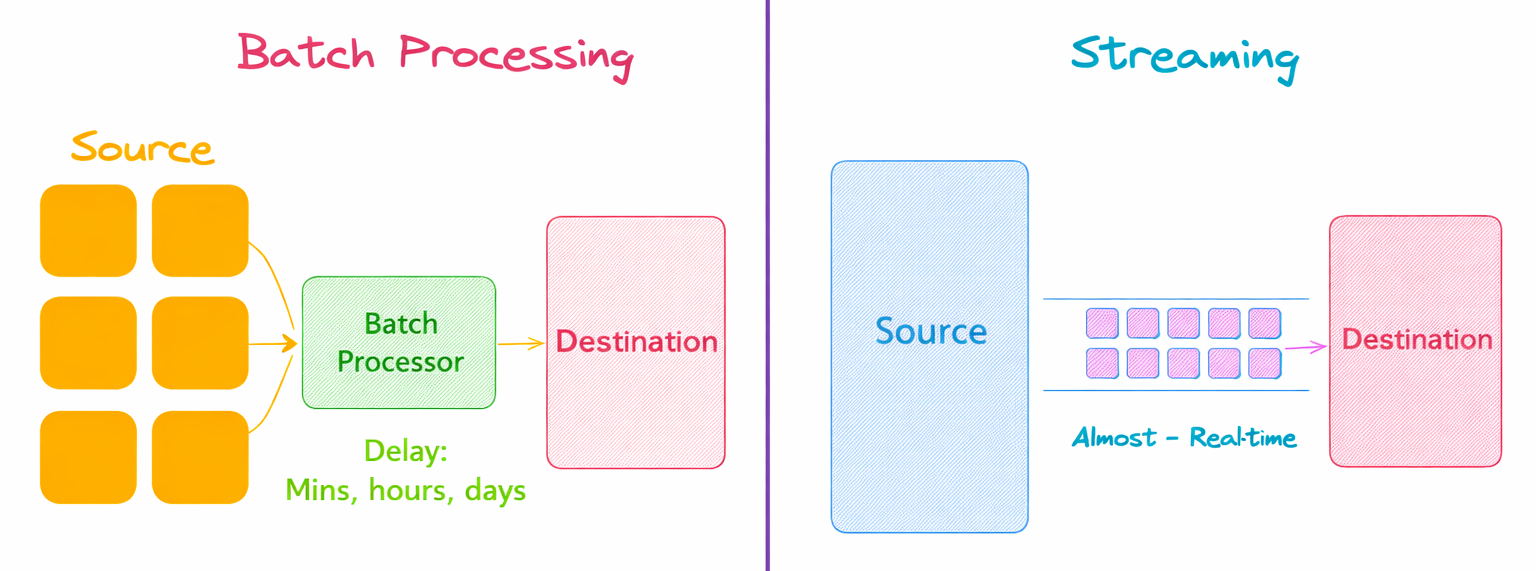
As AI usage grows, another silent cost driver starts to appear: too many small requests. Many startups send AI requests one by one because it feels simple and real-time. The problem is that each request carries overhead—and when repeated at scale, that overhead becomes expensive. Batching helps you get more work done with fewer AI calls.
What Batching Really Means
Batching is the practice of grouping multiple inputs into a single AI request instead of sending them individually. For example:
- Instead of generating embeddings for 100 documents one by one
- You send all 100 documents in a single request
The AI model processes them together, and you pay less overall than you would for 100 separate calls.
Where Batching Works Best
Batching is especially effective for non-real-time workloads, such as:
- Embedding generation
- Data classification
- Content tagging
- Background summarization jobs
- Analytics and enrichment pipelines
If the task doesn’t need an instant response, batching should almost always be your default approach.
Batching vs Real-Time Requests
It’s important to be intentional here.
- Real-time user interactions (chat, live suggestions) usually shouldn’t be batched
- Background and internal workflows almost always should be
A common and effective pattern is:
- Real-time requests → small, optimized, token-limited calls
- Background jobs → batched, scheduled, cost-efficient calls
This separation alone can dramatically reduce overall AI spend.
4. Request Throttling: Preventing Cost Spikes Before They Happen
One of the most painful AI cost problems startups face isn’t steady growth it’s sudden spikes. Everything looks fine day to day, usage feels normal, and costs appear predictable. Then one small issue an unnoticed bug, a traffic surge, or a misconfigured workflow triggers thousands of AI requests within minutes. The result is a bill that no one expected and no one budgeted for.
What makes these spikes especially dangerous is how invisible they are in real time. From a system perspective, nothing is technically broken. Requests are valid, responses are returned, and the application keeps running. Financially, however, costs are exploding in the background.
What Request Throttling Means in Simple Terms
Request throttling is about setting limits on how often AI can be called.
It allows you to define:
- How many requests a user can make
- How many requests a system or service can send
- How fast requests can be processed over time
Instead of letting AI usage grow unchecked, throttling adds guardrails that keep usage—and cost—within safe boundaries.
Why AI Cost Spikes Happen So Easily
AI systems are often deeply integrated into:
- User actions (chat, search, recommendations)
- Automated jobs
- Background pipelines
- Internal tools
A small issue like a retry loop, bot traffic, or a sudden usage surge can trigger thousands of calls almost instantly. Without throttling, the system keeps sending requests because technically nothing is “broken.”
Financially, though, everything is.
How Throttling Protects Both Cost and Stability
When throttling is in place:
- Traffic spikes are capped
- Runaway processes are slowed or stopped
- Costs remain predictable
- Systems stay responsive under load
Instead of failing hard, your system can gracefully degrade delaying requests, queueing them, or returning controlled responses.
5. Model Selection Based on Workload: Paying for Intelligence Only When You Need It
One of the biggest and most expensive mistakes startups make with AI is using the same powerful model for every task. While advanced models are impressive, they are also costly and many everyday workloads simply don’t need that level of intelligence.
Smart cost control starts with a simple idea: pay for intelligence only when you actually need it.
Not Every Task Requires a Powerful Model
AI workloads vary widely in complexity. Some tasks require deep reasoning and contextual understanding, while others are straightforward and repeatable. For example:
- Classifying text or tagging data
- Formatting or rewriting content
- Extracting structured information
- Generating embeddings
These tasks often perform just as well on smaller, faster, and cheaper models. Using a top-tier model for them doesn’t significantly improve results—it just increases cost.
Not Every Task Requires a Powerful Model
A more cost-efficient approach is to map models to workloads based on difficulty and business value. Common patterns include:
- Lightweight models for simple, high-volume tasks
- Mid-tier models for summarization or content generation
- Advanced models reserved for complex reasoning, planning, or decision-making
This way, expensive models are used sparingly and intentionally, where they deliver real value.
Dynamic Model Routing Works Best
Many mature AI systems don’t rely on a single model at all. Instead, they use dynamic routing:
- Start with a cheaper model
- Escalate to a more advanced one only if needed
- Route high-value or premium users differently
This approach keeps costs low while maintaining quality where it matters most.
Putting It All Together: A Cost-Optimized AI Architecture
By now, each strategy makes sense on its own. The real power, however, comes when they are designed together as a single system. A cost-optimized AI architecture isn’t about one trick—it’s about building clear decision points into how AI is used across your product. Think of it as a smart pipeline, where every request passes through layers that reduce waste before it reaches the model.
How a Cost-Optimized AI Flow Works
At a high level, a mature startup AI architecture looks like this:
- Request enters the system:
- A user action, API call, or background job triggers an AI request.
- Token limits and prompt optimization:
- The request is trimmed, structured, and capped to avoid unnecessary token usage.
- Caching layer:
- The system checks whether a valid response already exists. If yes, it returns instantly no AI call, no cost.
- Batching (if applicable):
- For background or non-real-time workloads, requests are grouped and processed together.
- Request throttling:
- Rate limits ensure traffic spikes, bugs, or abuse don’t cause runaway costs.
- Model selection based on workload:
- The request is routed to the most cost-effective model that can handle the task.
- Monitoring and visibility:
- Token usage, request volume, and cost are tracked continuously to catch issues early.
Conclusion: Build AI That Scales Without Breaking Your Budget
AI can be a powerful growth engine for startups but only if it’s used intentionally. The biggest challenge isn’t adopting AI; it’s scaling it responsibly. As we’ve seen, AI costs don’t usually fail loudly. They grow quietly through small inefficiencies that compound over time.
The good news is that AI cost control doesn’t require sacrificing quality or slowing down innovation. By setting token limits, optimizing prompts, caching repeated responses, batching background work, throttling requests, and choosing the right model for each task, startups can dramatically reduce spend while still delivering great user experiences.
More importantly, these strategies shift AI from an experimental feature into a reliable piece of infrastructure. When costs are predictable, teams can focus on building, experimenting, and scaling without worrying about surprise invoices at the end of the month.